Applies to
Volt MX Mobile Android
Introduction
Important: Google Play Deadline for 16KB Support
Google has announced that starting November 1, 2025 , all new apps and app updates submitted to the Play Store must support the 16KB page size on native libraries to ensure compatibility with Android 15+ devices.
- Apps including any native code must be fully 16KB-compliant by this deadline.
- We strongly recommend verifying your entire dependency tree and completing testing well ahead of this deadline .
Our Commitment: 16KB Support in Our Framework
As part of our ongoing commitment to platform compatibility and performance, we’re actively working to ensure our framework is fully compliant with Android’s new 16KB memory page size .
We’re currently updating our native components to support this shift. Full compatibility will be made available at earliest.
In the meantime, we recommend reviewing your application for any third-party or custom native libraries that may not yet support 16KB pages.
Instructions
What Still Needs Your Attention
Many Android apps include native code beyond the core framework — and this is where compatibility issues may arise.
If your app generates any other .so apart from the ones from our framework, then you need to verify whether any additional .so files in your app are 16KB-compatible .
These could come from:
- Third-party SDKs (e.g., camera, media, ads, analytics)
- Gradle dependencies that bundle native binaries
- Custom C/C++/JNI code written by your team
Note: These native components are not under our control, so we recommend auditing your entire build output.
How to Check .so Files for 16KB Compatibility
Identify native libraries using APK Analyzer
APK Analyzer is a tool that lets you evaluate various aspects of a built APK.
- Open Android Studio , then click File > Open and choose any project.
- From the menu bar, click Build > Analyze APK…
- Choose the APK you want to analyze.
Look within the lib folder, which hosts shared object (.so) files if any are present. If any shared object files are present, your app uses native code. The Alignment column displays warning messages for any files that have alignment issues.
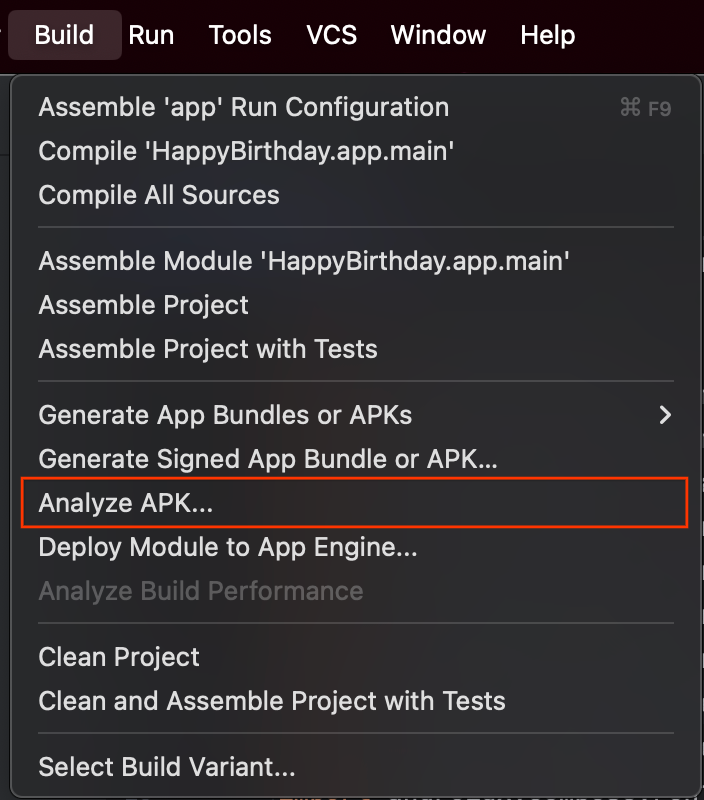
Utilize the “Analyze APK” feature within Android Studio to examine the APK, as shown in above Image.

APK Analysis output, the Alignment column display warning for any file that has alignment issue as shown in above image.
Identify native libraries using Command Line
Ensure the following are installed:
- Android SDK Build-Tools ≥ 35.0.0
- Android NDK (any version will work, e.g., 28.0.12433566)
Step 1: Extract APK
On Linux/macOS:
unzip APK_NAME.apk -d /tmp/my_apk_out
On Windows (PowerShell):
Expand-Archive -Path APK_NAME.apk -DestinationPath C:\temp\my_apk_out
Step 2: Locate Shared Object Files
Navigate to: /tmp/my_apk_out/lib/
or on Windows: C:\temp\my_apk_out\lib\
Look for .so files inside ABI-specific folders (e.g., armeabi-v7a, arm64-v8a etc.).
Step 3: Inspect Each .so File’s Segment Alignment
Run this command for each .so file :
On macOS/Linux:
/path/to/sdk/ndk/NDK_VERSION/toolchains/llvm/prebuilt/darwin-x86_64/bin/llvm-objdump -p SHARED_OBJECT_FILE.so | grep LOAD
On Windows (PowerShell):
/path/to/sdk/ndk/NDK_VERSION/toolchains/llvm/prebuilt/windows-x86_64/bin/llvm-objdump.exe -p SHARED_OBJECT_FILE.so | Select-String LOAD
Replace:
- /path/to/sdk with your Android SDK root
- NDK_VERSION with the installed NDK version
- SHARED_OBJECT_FILE.so with the file name
Sample Output
LOAD off 0x0000000000000000 vaddr 0x0000000000000000 paddr 0x0000000000000000 align 2**14
LOAD off 0x0000000000042a90 vaddr 0x0000000000043a90 paddr 0x0000000000043a90 align 2**14
LOAD off 0x0000000000046230 vaddr 0x0000000000048230 paddr 0x0000000000048230 align 2**14
What to Look For
- Review the output lines to ensure that all LOAD segment alignments are 214** or higher. If any segment shows an alignment of 213** , 212** , or lower, the .so file is not compatible with 16KB page size.

Image 1. Not Aligned to 16K page size as LOAD segment has values less than 214**

Image 2. Aligned to 16K page size as LOAD segment has values greater than or equal to 214**
What to Do If You Find 4KB-only Libraries
If any third-party .so is not 16KB-aligned:
-
Update – Contact the library vendor or upgrade to a newer version with NDK r26+ support.
-
Rebuild – For your own native code:
- Rebuild the native code using guidelines provided on the below official Android page.
- https://developer.android.com/guide/practices/page-sizes
- Replace – If the library is outdated or unmaintained, consider modern alternatives.