I’m looking for a clear explanation of how to create a Registered OAuth Client on Domino 14.5 and use it to make the Authorize button in DRAPI Swagger work with the Domino OIDC.
The goal is to have a C# application authenticate against Domino OAuth and retrieve data with DRAPI.
Logging in with OIDC works fine, and I receive an access_token, but when I use it to authenticate against the Rest API, I get an unauthorized message. Unfortunately, I’m not entirely sure how all this should work together.
If anyone has an explanation, I would be very grateful.
You don’t need to authenticate against a Domino server prior to access Domino Rest API.
You can configure Domino Rest API to use Domino (or others ) as a OIDC provider:
Domino REST API offers a built-in endpoint to exchange your Domino credentials for a valid JSON Web Token (JWT). This page describes the setup of external JWT identity providers (IdP).
Thanks for the link. I’d read all these documents. However, I can’t get the /admin/ui to register with the Domino OIDC in the idpcat.nsf. The debug log information detects the registration and returns error = No Error. However, I now get an error on the ui: {
“status”: 404,
“message”: “This is not the URL you seek!”,
“errorId”: 0
}.
This worked before, so I must have made a mistake in the new configuration of the idpcat or the jwt.json in keepconfig.d.
However, when the registration was successful, it didn’t unlock the Swagger UI for the demo.nsf. Therefore I would find it very useful if there was an example of both the settings in Registering a new OAuth client as well as the domino-oidc-idpcat json that is needed to enable login ( Using Admin UI - HCL Domino REST API Documentation ) so that OAuth also becomes an option under Available authorizations.
Edit debug output:
21-01-2026 11:29:12,99 [0668:0094-5840] OIDCPIsDominoProviderSite> Found hostname mrpowerzbook.ineco.nl in the cache
21-01-2026 11:29:13,01 [0668:0094-5840] SECIdPCatUpdateOIDCPCache> OIDCPGetPrimaryServer CN=MRPOWERZBOOK/O=INECO
21-01-2026 11:29:13,01 [0668:0094-5840] SECIdPCatUpdateOIDCPCache> IDPCAT_ACTION_INIT HostName mrpowerzbook.ineco.nl, action 1, error = No error
21-01-2026 11:29:13,01 [0668:0094-5840] SECIdPCatUpdateOIDCPCacheRegClient> Error locking context 2: No error
21-01-2026 11:29:13,01 [0668:0094-5840] SECIdPCatUpdateOIDCPCacheRegClient> Registered Client Friendly Name: [keepadminui]
21-01-2026 11:29:13,01 [0668:0094-5840] SECIdPCatUpdateOIDCPCacheRegClient> Registered Client client_id: [keepadminui]
21-01-2026 11:29:13,01 [0668:0094-5840] SECIdPCatUpdateOIDCPCacheRegClient> Registered Client token endpoint auth method (dwFlags): 2 (0x2)
21-01-2026 11:29:13,01 [0668:0094-5840] SECIdPCatUpdateOIDCPCacheRegClient> Registered Client scope(s): [openid profile Domino.user.all]
21-01-2026 11:29:13,01 [0668:0094-5840] SECIdPCatUpdateOIDCPCacheRegClient> Registered Client audience(s): keepadminui;https://mrpowerzbook.ineco.nl:8857/admin/ui
21-01-2026 11:29:13,01 [0668:0094-5840] SECIdPCatUpdateOIDCPCacheRegClient> Registered Client jwks_uri:
21-01-2026 11:29:13,01 [0668:0094-5840] SECIdPCatUpdateOIDCPCacheRegClient> Registered Client redirect_uri(s): https://mrpowerzbook.ineco.nl:8857/admin/ui/callback
21-01-2026 11:29:13,01 [0668:0094-5840] SECIdPCatUpdateOIDCPCacheRegClient> Registered Client backchannel_logout_uri:
21-01-2026 11:29:13,01 [0668:0094-5840] SECIdPCatUpdateOIDCPCacheRegClient> Registered Client post_logout_redirect_uri(s):
21-01-2026 11:29:13,01 [0668:0094-5840] SECIdPCatUpdateOIDCPCacheRegClient> Registered Client Allowed Web Origins(s): https://mrpowerzbook.ineco.nl
21-01-2026 11:29:13,01 [0668:0094-5840] SECIdPCatUpdateOIDCPCacheRegClient> Registered Client Allowed Group name:
21-01-2026 11:29:13,01 [0668:0094-5840] SECIdPCatUpdateOIDCPCacheRegClient> Registered Client app type (1): dwFlags (0x10002)
21-01-2026 11:29:13,01 [0668:0094-5840] SECIdPCatUpdateOIDCPCacheRegClient> Registered Client logout verification option (dwFlags): 0 (0x11002)
21-01-2026 11:29:13,01 [0668:0094-5840] SECIdPCatUpdateOIDCPCacheRegClient> Registered Client access_token alg (AlgType): ES256 (57)
21-01-2026 11:29:13,01 [0668:0094-5840] SECIdPCatUpdateOIDCPCacheRegClient> Registered Client id_token alg (AlgType): ES256 (57)
21-01-2026 11:29:13,01 [0668:0094-5840] SECIdPCatUpdateOIDCPCacheRegClient> Registered Client is PKCE optional (dwFlags): 0 (0x11002)
21-01-2026 11:29:13,01 [0668:0094-5840] SECIdPCatUpdateOIDCPCacheRegClient> Registered Client limited to introspection endpoint (dwFlags): 0 (0x11002)
21-01-2026 11:29:13,01 [0668:0094-5840] SECIdPCatUpdateOIDCPCacheRegClient> Registered Client does not contain a trusted root for back-channel logout
21-01-2026 11:29:13,01 [0668:0094-5840] SECIdPCatUpdateOIDCPCacheRegClient> Registered Client requires end user consent (dwFlags): 0 (0x11002)
21-01-2026 11:29:13,01 [0668:0094-5840] SECIdPCatUpdateOIDCPCacheRegClient> Registered Client Custom Consent Text:
21-01-2026 11:29:13,01 [0668:0094-5840] SECIdPCatUpdateOIDCPCacheRegClient> Registered Client Access Token Lifetime: 300
21-01-2026 11:29:13,01 [0668:0094-5840] SECIdPCatUpdateOIDCPCacheRegClient> Registered Client ID Token Lifetime: 900
21-01-2026 11:29:13,01 [0668:0094-5840] SECIdPCatUpdateOIDCPCacheRegClient> Registered Client Refresh Token Lifetime: 3600
21-01-2026 11:29:13,01 [0668:0094-5840] SECIdPCatUpdateOIDCPCacheRegClient> Registered Client Max Session Lifetime: 57600
21-01-2026 11:29:13,01 [0668:0094-5840] OIDCPAddClient> Entering to add “keepadminui” (client_id=keepadminui) for OIDCP host mrpowerzbook.ineco.nl
21-01-2026 11:29:13,01 [0668:0094-5840] OIDCPAddClient> client_id keepadminui is already in the cache
21-01-2026 11:29:13,01 [0668:0094-5840] OIDCPAddClient> Constructed issuer https://mrpowerzbook.ineco.nl/auth/protocol/oidc
21-01-2026 11:29:13,01 [0668:0094-5840] OIDCPAddClient> Allocated 358 bytes for new OIDCP_CACHED_CLIENT
21-01-2026 11:29:13,01 [0668:0094-5840] DeleteRegClient> Entering with client_id keepadminui
21-01-2026 11:29:13,01 [0668:0094-5840] DeleteRegClient> client_id keepadminui was already in the cache; deleting
21-01-2026 11:29:13,02 [0668:0094-5840] OIDCPCheckForKey> Entering
21-01-2026 11:29:13,02 [0668:0094-5840] OIDCPCheckForKey> keyset 1, wAlgType 57 already exists
21-01-2026 11:29:13,02 [0668:0094-5840] OIDCPCheckForKey> Entering
21-01-2026 11:29:13,02 [0668:0094-5840] OIDCPCheckForKey> keyset 1, wAlgType 57 already exists
21-01-2026 11:29:13,02 [0668:0094-5840] OIDCPAddClient> Adding new OIDCP_CACHED_CLIENT to head of linked list
21-01-2026 11:29:13,02 [0668:0094-5840] SECIdPCatUpdateOIDCPCacheRegClient> OIDCPAddClient returned error 0x0000
21-01-2026 11:29:13,02 [0668:0094-5840] SECIdPCatUpdateOIDCPCache> SECIdPCatUpdateOIDCPCacheRegClient RCPHostName mrpowerzbook.ineco.nl, error = No error
When reading
Auth\* - HCL Domino REST API Documentation and starting with line “Domino as an OIDC provider,” it says: The following configuration allows the Domino REST API to use Domino as an OIDC provider:
{
“domino-oidc-idpcat”: {
“active”: true,
“providerUrl”: “https:///auth/protocol/oidc”,
“clientId”: “some-clientid”,
“clientSecret”: “some-clientsecret”,
“scope”: “Domino.user.all”,
“aud”: “https://”
}
}
This is the example for calling the API.
I can’t get it to work because it’s unclear what authentication method should be selected in the Registered OAuth Client configuration. When Client Secret Post is selected, only post commands to the API seem to work correctly because you can only provide the secret here. Can someone provide an example of the correct Registered OAuth Client configuration for DRAPI?
I’d also like to see the same information in the documentation for “To be fully operational, you need to configure at least three clients on your IdP:”
- Domino for the server (client secret might be handled by idpcat.nsf).
- keepadminui for the Domino REST API admin client. If you also want to use your IdP for Domino REST API Admin UI login,
- keepofba for the Office document roundtrip experience. If you also want to use your IdP for Domino REST API, OFBA roundtrip editing authentication.
I’d also like to see how to configure this so that the Swagger page includes the OIDC option, which should be possible.
I’m really missing a clear explanation here (or maybe I’m looking at it wrong) about how to properly combine JSON files in the keepconfig.d folder with the correct Registered OAuth Client documents in Domino.
Does Rest API 1.1.6 even work with Domino 14.5(1) as OIDC provider?
When I use the search engines, I get so much information from the HCL sites about what the various JSON configurations should look like that it’s hard to know what to use. I’ve tried everything and haven’t gotten a single positive result. I’m slowly losing patience.
Errors like this:
OIDCLoginCmd::HandleIntrospectionRequest> token’s iss HCL Project KEEP RANDOM does not match our issuer https://mrpowerzbook.ineco.nl/auth/protocol/oidc
Domino REST API does support Domino 14.5’s OIDC provider implementation and we are working on updating the doc with a step-by-step walk through.
There are no plans to allow the swagger page to implement OIDC.
This should be available in a few days. I will ping back when it is.
Thank you, I really appreciate this!
There is an now an example of how to configure a Domino 14.5 OIDC provider for DRAPI.
Please see the following guide.
Thank you for the guide!
I removed my old configuration and started over using the guide.
I can log in to native Domino with OIDC, for example when navigating to names.nsf.
On the Domino REST API page there is no new drowdown other than DRAPI.
When the page is loaded this is printed to the Domino console:
30-01-2026 21:13:34,27 [81B8:0066-7BC4] FindMatchingProvider> Match found
30-01-2026 21:13:34,27 [81B8:0066-7BC4] SECValidateAccessToken> JWT includes: email=, iss=HCL Project KEEP RANDOM, kid=, alg=HS256, sub=CN=MRPOWERZBOOK/O=INECO, auth_time=0, iat=1769804014, exp=1769811214
30-01-2026 21:13:34,27 [81B8:0066-7BC4] SECValidateAccessToken> JWT includes: upn=, at_hash=, scope=MAIL $DATA $DECRYPT $SETUP Domino.user.all, azp=, nonce=, acr=, aud.count=1, amr.count=0
30-01-2026 21:13:34,27 [81B8:0066-7BC4] SECValidateAccessToken> JWT includes: TypHeader=JWT, TypPayload=, clientId=, jti=, event=0, CN=CN=MRPOWERZBOOK/O=INECO, lsid=
30-01-2026 21:13:34,27 [81B8:0066-7BC4] SECValidateAccessToken> Cannot use a JWT lacking email or iss or kid or aud
30-01-2026 21:20:13,96 [85A4:000F-6FC0] SECCheckForOIDCUpdates> Entering with 1 providers in cache
30-01-2026 21:20:13,96 [85A4:000F-6FC0] SECCheckForOIDCUpdates> Provider https://auth.ineco.nl/auth/protocol/oidc; expiration 31-01-2026 21:19:06
30-01-2026 21:20:13,96 [85A4:000F-6FC0] SECCheckForOIDCUpdates> Last purged cache 30-01-2026 21:18:16; 117 sec since last purge; 43200 interval
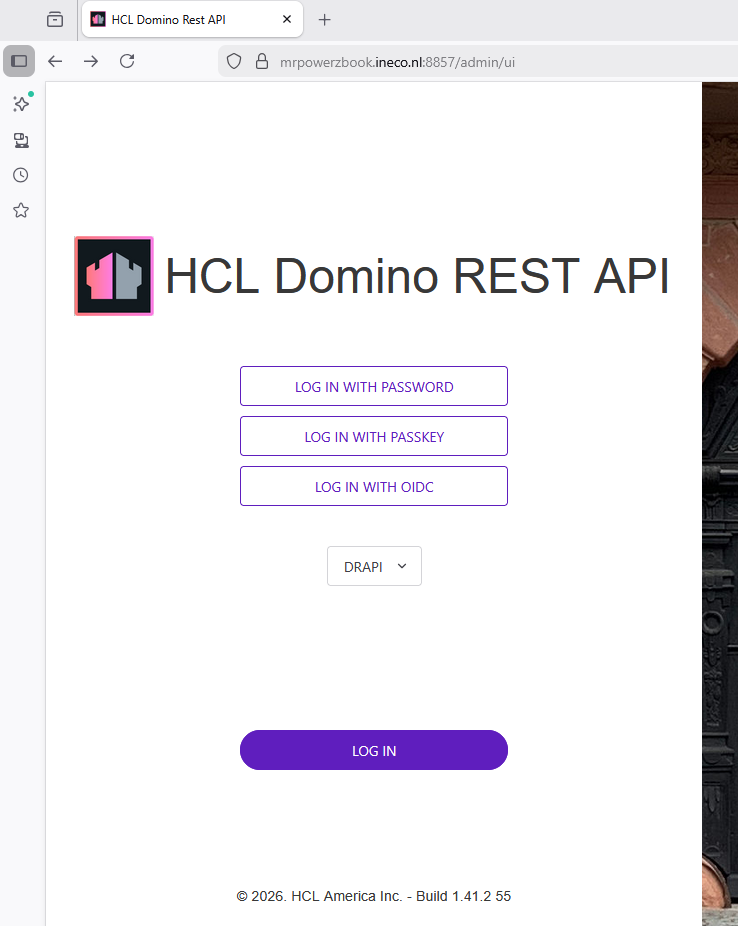
When click on LOG IN WITH OIDC and LOGIN
{
“status” : 404,
“message” : “This is not the URL you seek!”,
“errorId” : 0
}
The latest status is that it has now been possible to successfully log in to Domino as an OIDC provider with an external application (Razor page application written in C#) and retrieve data via the DRAPI with the access token. That was the main goal. It would be nice if the admin UI could also authenticate with the Domino OIDC provider, but that is more because it is useful and should work than because it is necessary.