Hello
Does any know a way to take an e-mail and store it automatically into a Notes database?
We have a Purchasing shared mailbox and they receive new supplier request e-mails into it. What they want to do is to have those e-mails stored into a Notes database for safekeeping, historical purposes, etc...
I've tried to do this with a simple agent using the "copy to database" function, but it does not work.
Thank you for looking.
Best regards
Richard.
Hi Richard,
This may not exactly answer to your point but if its for safekeeping/historical purposes, then you can create a user then simply create a forward or send copy mail rule to that user then that user's mail database can serve as your Notes database.
There are many ways to do it
1. one internet address to many mail for many notes user
create a group and define a internet address. as Purchasing@a.b.c, And add these user 's notes mail into this group. Then customer send mail to Purchasing@a.b.c will be work
2.one internet address to one mail-in DB. Need to create ACL for each notes user
create a mail-in database and create ACL for these notes user who need to look at this mail
refer : https://help.hcltechsw.com/domino/11.0.0/admin/admn_creatingamailindatabasedocumentforanewdatabase_t.html
There are several ways to forward a copy of an email to another user. See below link:
How to forward mail message while leaving a copy in the user's Domino mail file
How to forward mail message while leaving a copy in the user's Domino mail file
https://support.hcltechsw.com/csm?id=kb_article&sysparm_article=KB0032681
Hi Richard,
You may try this.
1. Create a Mail-in database.
2. Now create a mail rule in the Mailbox to send full copy to above mail-in database as per below given screenshot.
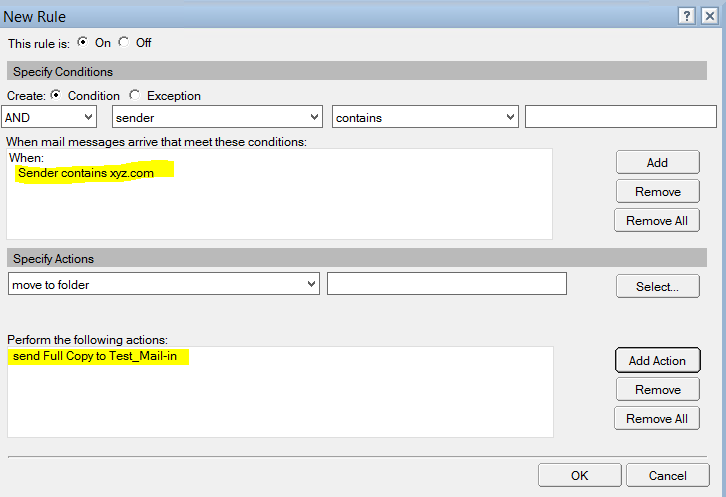
Agree the suggestion to use a MailIn Db would be my recommendation too !
Hi,
you can do this with a Server based Rule.
First configure Journaling, which is in the configuration Settings Document Tab "Router/SMTP" --> "Advanced" --> "Journaling". Then go to Tab "Router/SMTP" --> "Restrictions and Controls" --> "Rules", create a Rule, define the Conditions and select "Journaling" as action.
I was to slow :-)
way1:
Simple agent for Copy to the database
1. Create a simple action agent with action as Copy to the database and select destination database
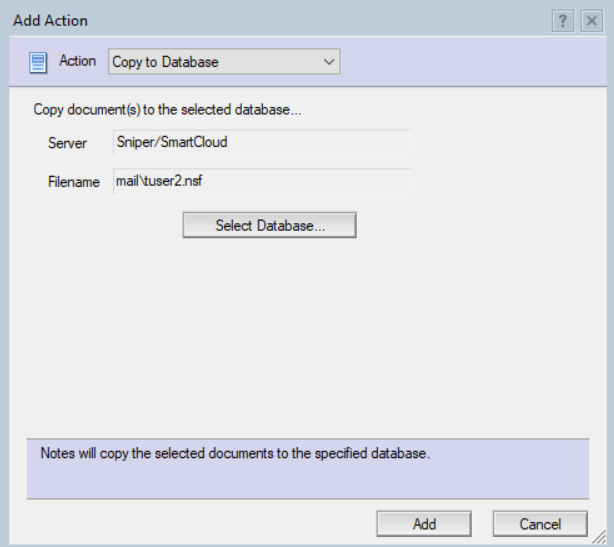
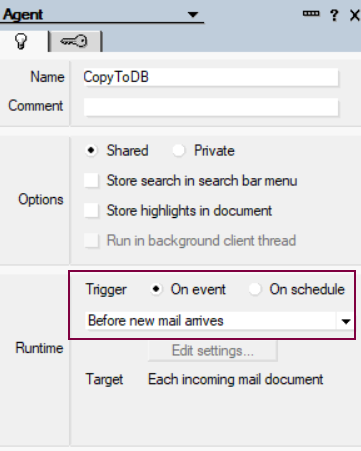
2. set the trigger as below from the agent property
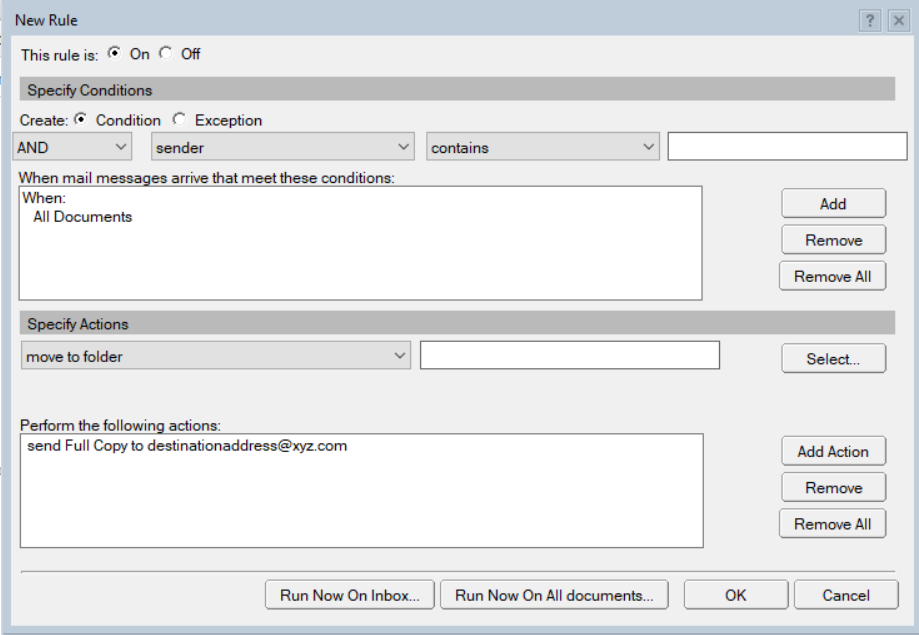
way2: Create Rule as below for sending copy
way3: Using the Lotusscript method CopyTodatabase
Call doc.CopyToDatabase(archiveDB)
You can use a CRM system for Notes in which you manage addresses of your customers/suppliers and then assign the mails to them. Everyone then has access to the mails. You can also enter such a CRM database as a mailin address so that all enquiries can be processed directly.
Additional you can do that with Outlook Mails :-)
Additionally, one can use the below KB article for Auto Forward the email using Lotus Script and save the forwarded email in the Sent view
https://support.hcl-software.com/csm?id=kb_article&sysparm_article=KB0074383
As others already recommended: Use mail journaling. It's at server level, centrally managed, it's before the email is delivered to the mail database, incoming emails could be encrypted, the ACL of the mail in database can be completely closed.
This way is good for legal purposes: You document ALL emails without user beeing able to delete or manipulate anything. You can proof, not only which emails you got, but also, which you didn't get.
It depends on the full purpose. We have create a subform that was included on top of the Notes form. And said subform creates a Notes document in another database and copies the email content into this form. And this database has follow-up and other capabilities for tracking/process purposes.
This way we don't have the zillions of useless emails that clog up archives and the archiving is the first process of the workflow - so whatever email transforms into a process gets archived to start the process.
I'll be happy to assist you with our experiences doing this