We're running HCL Portal Server 9.5.5.0 on an IBM Websphere instance. When we log in as the admin user, the configuration menu (not sure what it's actually called, it has a wrench icon) is missing. Does anyone know how to get this to show up?

Hello Matt,
There is no Portal version 9.5.5.0. Can you please run this to get the proper Portal version for us?
Run the WPVersionInfo.sh under <wp_profile>/PortalServer/bin/ and provide the output.
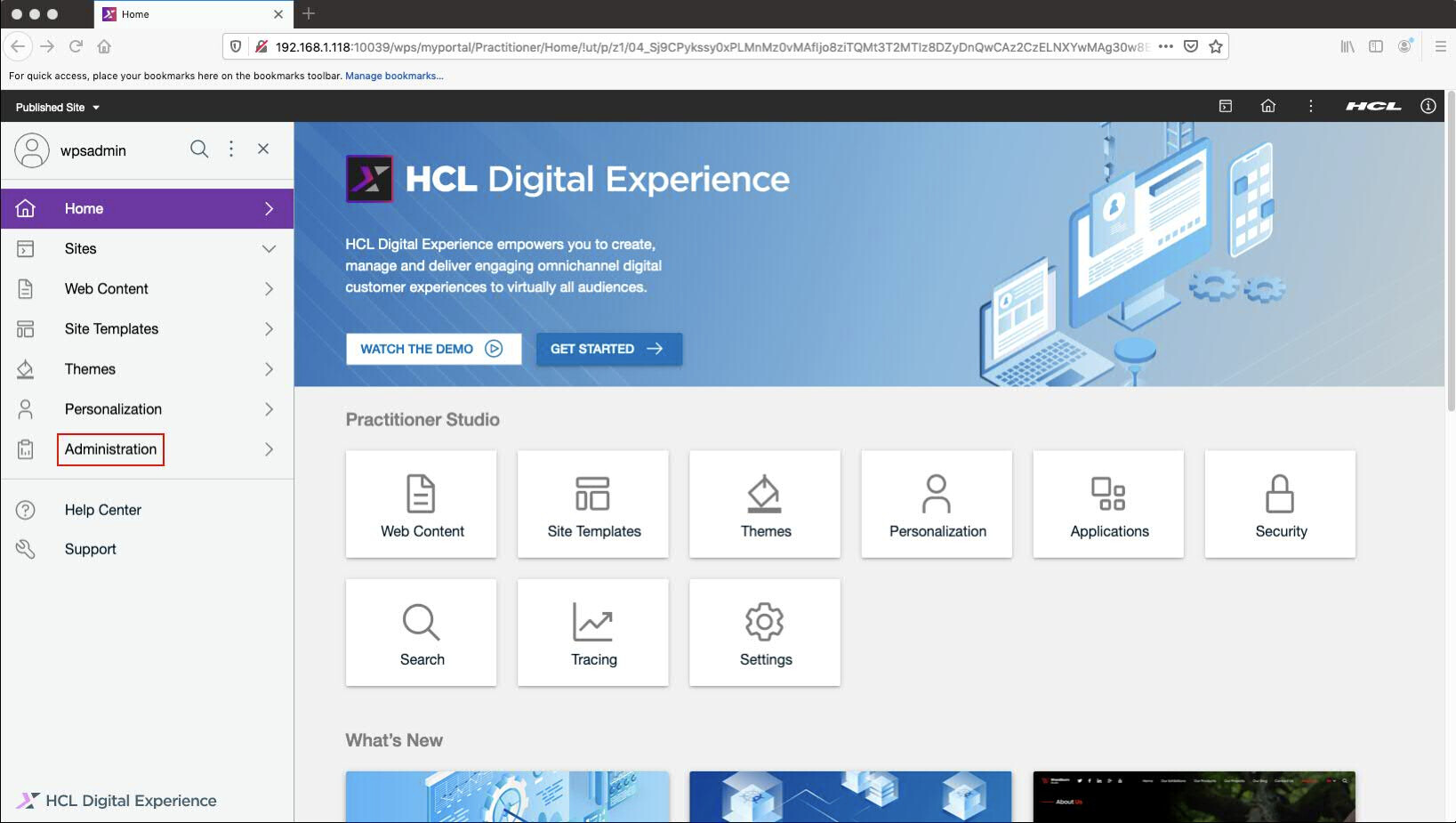
There is not the traditional "wrench" icon in the new Portal 9.5 view (if you have these enabled), it is referred to as "Practitioner Studio." From there you can select "Administration."
You can also go directly to this URL in Portal version 9.5:
http://<host>:<port>/wps/myportal/Practitioner/Administration
Hello Matt,
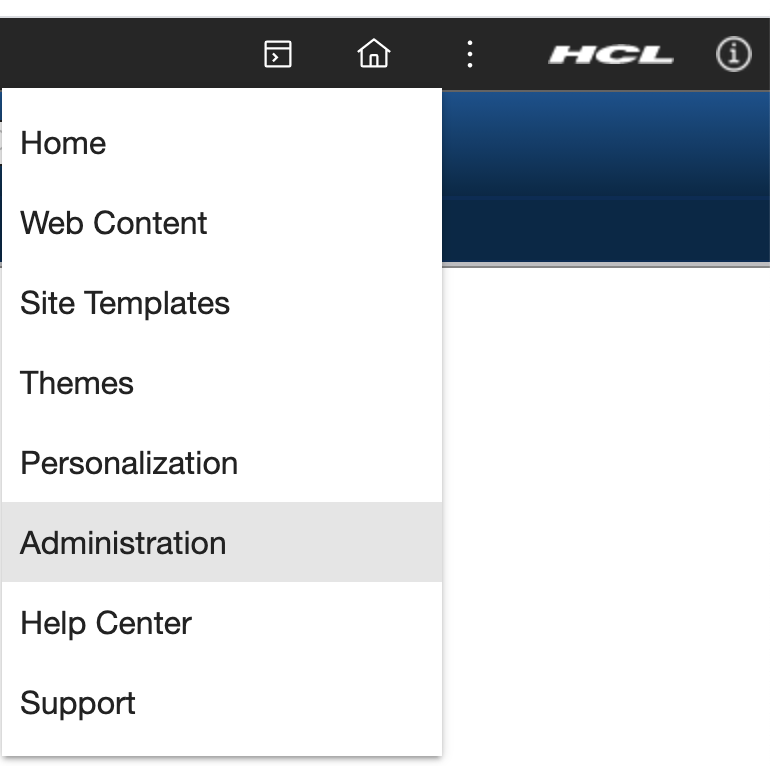
To address your concerns, and assuming you are on 9.5, the wrench icon has been wrapped up underneath the Applications Icon (the icon with the squares). You can click Applications -> Administration to access many of your old Administration tools. Some tools and admin portlets have been moved to other areas to increase efficiency when administrating your portal.
To speak from personal experience, this takes a bit of getting used to! You can read more about it here: https://help.hcltechsw.com/digital-experience/9.5/practitioner_studio/practitionerstudio_overview.html
You can see my 9.5 theme shelf with those relevant buttons here:
Thanks for the replies, here is our version:
Package
id com.ibm.websphere.PORTAL.SERVER.v95
name HCL Portal Server
kind offering
version 9.5.0.20190929_0019
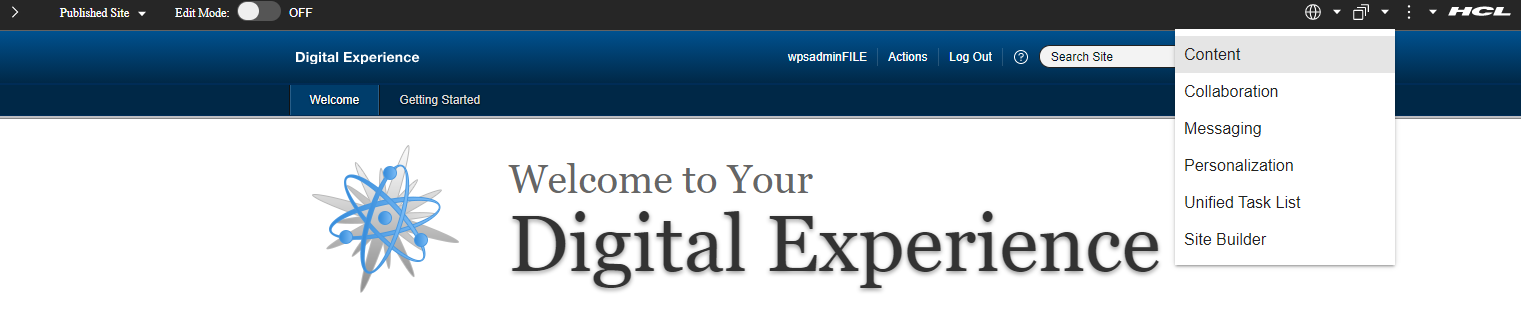
When I log in as the wpsadminFILE user I don't have anything for Administration under the "three squares" menu. See screenshot:
Also, when I try this URL: http://<host>:<port>/wps/myportal/Practitioner/Administration
I get the same thing as when I go to: http://<host>:<port>/wps/portal
The theme in your screenshots appears to be a Portal 8.5 theme...so perhaps you are on a Portal 8.5x version and not Portal 9.5x.
The icon in Portal 8.5 that you are referring to is actually a 'wrench' icon...

The screenshots you provided is what it looks like when you are NOT logged in as an Administrative user.
Please log on with a user with Admin rights and see if the 'wrench' appears.
Yes, that wrench icon is what we're after. I ran this command:
sh /opt/ibm/was/WebSphere/wp_profile/ConfigEngine/ConfigEngine.sh wp-change-portal-admin-user -DWasPassword=<pwd> -DnewAdminId=uid=wpsadminFILE,o=defaultWIMFileBasedRealm -DnewAdminPw=<pwd> -DnewAdminGroupId=cn=wpsadminsFILE,o=defaultWIMFileBasedRealm
And then logged in as this user: wpsadminFILE
But I'm still not getting the wrench. Is there something I'm missing?
Can you confirm that the wpsadminFILE user is actually a full admin with access to the administration pages? This is stored in lots of places - I would check at least the access permissions on the administration page in Managed Pages to start.
Sorry, where do I go/how do I check that? We're running this on a rhel7 host.
Matt, did you upgrade your portal from 8.5 to 9.5? Or is this a new install? Have you run the task mentioned in this link?
https://help.hcltechsw.com/digital-experience/9.5/practitioner_studio/enable_prac_studio.html
./ConfigEngine.sh enable-v95-UI-features -DWasPassword=<WAS admin password> -DPortalAdminPwd=<Portal admin password>
here is the status report when I run WPVersionInfo.sh
./WPVersionInfo.sh
WVER0010I: Copyright IBM Corporation 2002, 2014; All rights reserved.
WVER0011I: WebSphere Portal
WVER0012I: WPVersionInfo reporter version 1.10.1.1, dated 20201119_1430_DevBuild
--------------------------------------------------------------------------------
IBM WebSphere Portal Product Installation Status Report
--------------------------------------------------------------------------------
Report at date and time 2021-03-25T12:28:52-04:00
Installation
--------------------------------------------------------------------------------
Product Directory /opt/ibm/was/WebSphere/PortalServer
Version Directory /opt/ibm/was/WebSphere/PortalServer/version
DTD Directory /opt/ibm/was/WebSphere/PortalServer/version/dtd
Log Directory /opt/ibm/was/WebSphere/PortalServer/version/logs
Technology List
--------------------------------------------------------------------------------
MP installed
MP9 installed
MP95 installed
WCM installed
CFGFW installed
Installed Product
--------------------------------------------------------------------------------
Name IBM WebSphere Portal MultiPlatform
Version 9.0.0.0
Installed Fix CF19
ID MP
Build Level 20201119-191833 2020-11-19
Build Date 11/19/2020
Package
id com.ibm.websphere.PORTAL.SERVER.v85
name IBM WebSphere Portal Server
kind offering
version 8.5.0.20201119_1621
Installed Features Config Engine
Installed Features Portal Server Binary
Installed Features Portal Server Profile
Package
id com.ibm.websphere.PORTAL.SERVER.v90
name IBM WebSphere Portal Server
kind offering
version 9.0.0.20161208_1437
Installed Features portal9.upsell
Package
id com.ibm.websphere.PORTAL.SERVER.v95
name HCL Portal Server
kind offering
version 9.5.0.20190929_0019
Installed Features portal95.upsell
Installed Component
--------------------------------------------------------------------------------
Name IBM Web Content Manager
Version 8.5.0.0
Installed Fix CF19
ID WCM
Build Level 20201119-191833
Build Date 11/19/2020
Installed Component
--------------------------------------------------------------------------------
Name IBM WebSphere Portal Configuration Framework
Version 8.5.0.0
Installed Fix CF19
ID CFGFW
Build Level 20201119-191833 2020-11-19
Build Date 11/19/2020
Configured Profile
--------------------------------------------------------------------------------
Name wp_profile
Path /opt/ibm/was/WebSphere/wp_profile
Version 9.0.0.0
Installed Fix CF19
--------------------------------------------------------------------------------
End Installation Status Report
--------------------------------------------------------------------------------
Hi Matt, the version info definitely helps. In a file called ConfigTrace.log we can find out if the enable-v95-UI-features task has been executed. That said, it looks like this user doesn't have admin permissions like expected. Could you open a case with HCL Support so we can do a deeper dive into the issue?
Greetings Matt,
You're correct, you would see the old 8.5 theme on the 9.5 portal version (as you have) if you did not enable the new UI by running this task on the 9.5 Portal server: enable-v95-UI-features
Reference:
https://help.hcltechsw.com/digital-experience/9.5/practitioner_studio/enable_prac_studio.html
I see that you're using wpsadminFILE to try to access the admin pages. Are you able to login with wpsadmin and get to the admin? If you are, can you check here to see what users and groups have access to the administration?
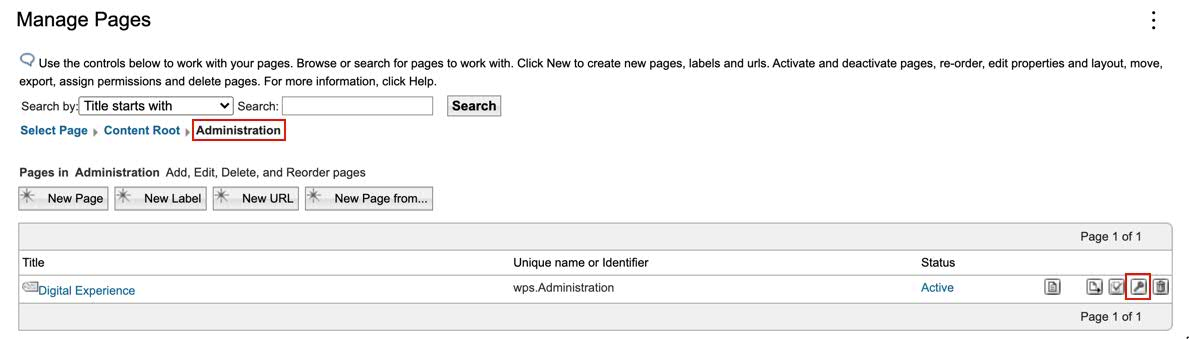
From there:
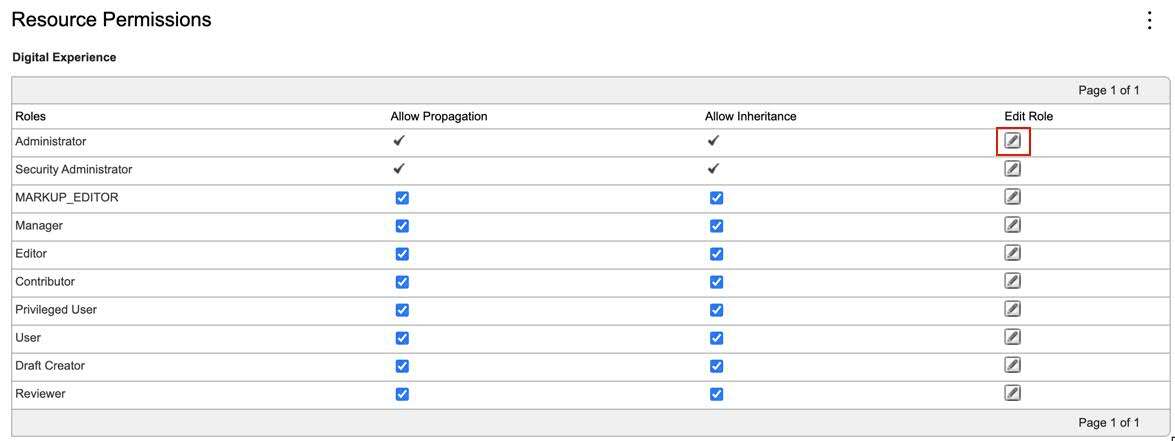
Then look at the users and groups that have Administrator access:
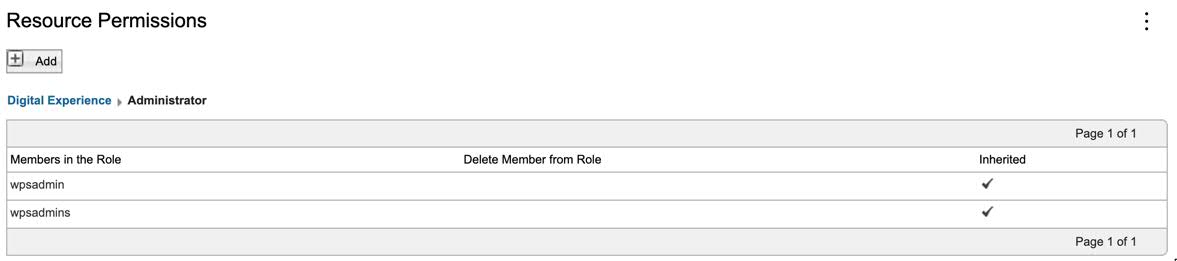
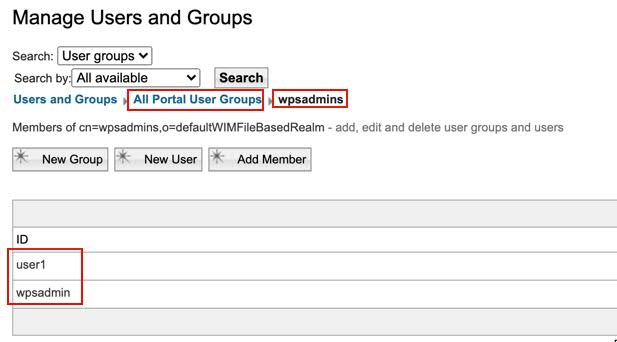
Then check the Users and Groups portlet to see if wpsadminFILE is in that group:
I can log in as either wpsadmin or wpsadminFILE but neither of those users have the "wrench" icon.
I ran this command: sh /opt/ibm/was/WebSphere/wp_profile/ConfigEngine/ConfigEngine.sh enable-v95-UI-features -DWasPassword=<pwd_redacted> -DPortalAdminPwd=<pwd_redacted>
But I don't believe it worked:
BUILD FAILED
/opt/ibm/was/WebSphere/PortalServer/wcm/prereq.wcm/config/includes/prereq.wcm_cfg.xml:4524: An exception occurred while executing the task: Status returned 302: Authentication failed for user: uid=wpsadminFILE,o=defaultWIMFileBasedRealm
When I log in the wrench is still missing. I'm not sure why the authentication would have failed, I'm certain I used the correct password.
I've attached the full fail log.
failure2021-03-25-01.00.59.txt
Greetings Matt,
Can you check in this file: HCL/wp_profile/config/cells/<cell>/security.xml
For this line:
<userRegistries xmi:type="security:WIMUserRegistry" xmi:id="WIMUserRegistry_1" serverId="" serverPassword="{xor}" realm="defaultWIMFileBasedRealm" ignoreCase="true" useRegistryServerId="false" primaryAdminId="wpsadmin" registryClassName="com.ibm.ws.wim.registry.WIMUserRegistry"/>
What is listed for: primaryAdminId
You can also check this file: HCL/wp_profile/config/cells/<cell>/nodes/<node>/servers/WebSphere_Portal/resources.xml
For the user defined to administer these resources:
<resources.env:ResourceEnvironmentProvider xmi:id="ResourceEnvironmentProvider_1607793704414" name="WP AccessControlDataManagementService">
<propertySet xmi:id="J2EEResourcePropertySet_1607793704416">
<resourceProperties xmi:id="J2EEResourceProperty_1607793707924" name="accessControlDataManagement.domain.rel.adminuser" value="uid=wpsadmin,o=defaultWIMFileBasedRealm" description="" required="false"/>
<resourceProperties xmi:id="J2EEResourceProperty_1607793707933" name="accessControlDataManagement.domain.rel.admingroup" value="cn=wpsadmins,o=defaultWIMFileBasedRealm" description="" required="false"/>
<resourceProperties xmi:id="J2EEResourceProperty_1607793707946" name="accessControlDataManagement.domain.rel.virtualresource" value="PORTAL" description="" required="false"/>
<resourceProperties xmi:id="J2EEResourceProperty_1607793707956" name="accessControlDataManagement.domain.cust.adminuser" value="uid=wpsadmin,o=defaultWIMFileBasedRealm" description="" required="false"/>
<resourceProperties xmi:id="J2EEResourceProperty_1607793707965" name="accessControlDataManagement.domain.cust.admingroup" value="cn=wpsadmins,o=defaultWIMFileBasedRealm" description="" required="false"/>
<resourceProperties xmi:id="J2EEResourceProperty_1607793707975" name="accessControlDataManagement.domain.cust.virtualresource" value="PORTAL" description="" required="false"/>
<resourceProperties xmi:id="J2EEResourceProperty_1607793707985" name="accessControlDataManagement.domain.comm.adminuser" value="uid=wpsadmin,o=defaultWIMFileBasedRealm" description="" required="false"/>
<resourceProperties xmi:id="J2EEResourceProperty_1607793707995" name="accessControlDataManagement.domain.comm.admingroup" value="cn=wpsadmins,o=defaultWIMFileBasedRealm" description="" required="false"/>
<resourceProperties xmi:id="J2EEResourceProperty_1607793708006" name="accessControlDataManagement.domain.comm.virtualresource" value="PORTAL" description="" required="false"/>
<resourceProperties xmi:id="J2EEResourceProperty_1607793708016" name="accessControlDataManagement.domain.jcr.adminuser" value="uid=wpsadmin,o=defaultWIMFileBasedRealm" description="" required="false"/>
<resourceProperties xmi:id="J2EEResourceProperty_1607793708026" name="accessControlDataManagement.domain.jcr.admingroup" value="cn=wpsadmins,o=defaultWIMFileBasedRealm" description="" required="false"/>
<resourceProperties xmi:id="J2EEResourceProperty_1607793708037" name="accessControlDataManagement.domain.jcr.virtualresource" value="PORTAL" description="" required="false"/>
<resourceProperties xmi:id="J2EEResourceProperty_1607793710091" name="accessControlDataManagement.privateOwnerActions.CONTENT_NODE.actions" value="1151" description="" required="false"/>
<resourceProperties xmi:id="J2EEResourceProperty_1607793710104" name="accessControlDataManagement.sharedOwnerActions.CONTENT_NODE.actions" value="1279" description="" required="false"/>
</propertySet>
</resources.env:ResourceEnvironmentProvider>
- security.xml contains the WAS administrator on the "WIMUserRegistry_1" lined noted above.
- resources.xml contains the Portal administrator via the "accessControlDataManagement.domain.rel.adminuser" property noted above.
- resources.xml also contains the Portal administrator group
I'd recommend logging in with the accessControlDataManagement.domain.rel.adminuser user noted - this should work with no fuss. If other users in the Portal administrator group are not working - that likely points to a misconfiguration of the LDAP in the Portal. Easily fixable - and agree with a post further down - a case with support would help dig into specifics. Would not be advisable to post sensitive LDAP details on a public forum.
Hi Matt, it looks like both wpsadmin and wpsadminFILE are listed?
cat security.xml | grep primaryAdminId
<userRegistries xmi:type="security:LocalOSUserRegistry" xmi:id="LocalOSUserRegistry" serverId="" serverPassword="{xor}" realm="" useRegistryServerId="false" primaryAdminId=""/>
<userRegistries xmi:type="security:CustomUserRegistry" xmi:id="CustomUserRegistry_1" useRegistryServerId="false" primaryAdminId="" customRegistryClassName="com.ibm.websphere.security.FileRegistrySample"/>
<userRegistries xmi:type="security:LDAPUserRegistry" xmi:id="LDAPUserRegistry_1" serverId="uid=wpsadmin,cn=people,redacted" serverPassword="{xor}KC8sHhsSFhFubQ==" realm="redacted_server_name" ignoreCase="true" useRegistryServerId="true" primaryAdminId="uid=wpsadmin,cn=people,redacted" useRegistryRealm="true" type="IBM_DIRECTORY_SERVER" sslEnabled="true" sslConfig="" baseDN="redacted" bindDN="uid=appbind,cn=people,dc=redacted" bindPassword="{xor}Pi8vPTYxO25tbGs=" searchTimeout="120" reuseConnection="true">
<userRegistries xmi:type="security:WIMUserRegistry" xmi:id="WIMUserRegistry_1" serverId="" serverPassword="{xor}" realm="defaultWIMFileBasedRealm" ignoreCase="true" useRegistryServerId="false" primaryAdminId="uid=wpsadminFILE,o=defaultWIMFileBasedRealm" registryClassName="com.ibm.ws.wim.registry.WIMUserRegistry"/>
Greetings Matt,
One of these is in the LDAP (IDS) and one on the file registry. I think Jack is right, we're going to need a case for this one. Please open a case with support and upload the wpcollector with it:
https://support.hcltechsw.com/csm?id=kb_article&sysparm_article=KB0012545
Thanks Matt!