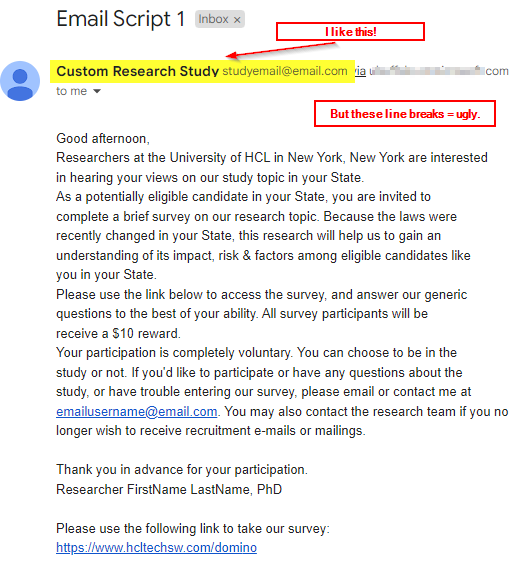
I'm losing my mind. Have a Notes application from which I want to send an email to selected documents within a view. I have a view that has an Action button ("Email Script 1") with LotusScript code on "Click" property. I want to manipulate the sender name to come from a shared mailbox so I set the Principal. This works fine, EXCEPT that when received, it is poorly formatted with some arbitrary hard returns in body of msg.
Sub Click(Source As Button) On Error Resume Next Dim session As New NotesSession Dim workspace As New NotesUIWorkspace Dim db As NotesDatabase Dim view As NotesView Dim doc As NotesDocument Dim coll As NotesDocumentCollection Dim mailDoc As NotesDocument Dim emailField As NotesItem Dim principal As String Dim subject As String Dim body As String Dim startTime As Variant Dim endTime As Variant Dim waitTime As Long' Set the principal and email content principal = "Custom Research Study <studyemail@email.com>" subject = "Email Script 1" body = "Good afternoon," & Chr(10) & _ "Researchers at the University of HCL in New York, New York are interested in hearing your views on our study topic in your State." & Chr(10) & _ "As a potentially eligible candidate in your State, you are invited to complete a brief survey on our research topic. Because the laws were recently changed in your State, this research will help us to gain an understanding of its impact, risk & factors among eligible candidates like you in your State." & Chr(10) & _ "Please use the link below to access the survey, and answer our generic questions to the best of your ability. All survey participants will be receive a $10 reward." & Chr(10) & _ "Your participation is completely voluntary. You can choose to be in the study or not. If you'd like to participate or have any questions about the study, or have trouble entering our survey, please email or contact me at emailusername@email.com. You may also contact the research team if you no longer wish to receive recruitment e-mails or mailings." & Chr(10) & _ Chr(10) & _ "Thank you in advance for your participation." & Chr(10) & _ "Researcher FirstName LastName, PhD" & Chr(10) & Chr(10) & _ "Please use the following link to take our survey: https://www.hcltechsw.com/domino" ' Get the current database Set db = session.CurrentDatabase ' Get the current view Set view = db.GetView("Batch_2") ' Get the selected documents in the view Dim uiView As NotesUIView Set uiView = workspace.CurrentView Set coll = uiView.Documents ' Loop through the selected documents Set doc = coll.GetFirstDocument While Not doc Is Nothing ' Get the email address from the "Email" field in Notes record Set emailField = doc.GetFirstItem("Email") ' Get the text value of the field Dim email As String email = emailField.Text ' Create a new mail document Set mailDoc = New NotesDocument(db) mailDoc.Form = "Memo" ' Set the sender, recipient, subject, and body mailDoc.Principal = principal mailDoc.SendTo = email mailDoc.Subject = subject ' Create a rich text item for the body and set the content Dim bodyItem As New NotesRichTextItem(mailDoc, "Body") bodyItem.AppendText(body) ' Send the email Call mailDoc.Send(False) ' Pause for 5 seconds startTime = Now waitTime = 5 ' seconds endTime = startTime + (waitTime / 86400) ' convert seconds to days (1 day = 86400 seconds) Do While Now < endTime ' Wait Loop ' Clean up Set doc = coll.GetNextDocument(doc) Set mailDoc = Nothing Set emailField = Nothing Wend Msgbox "Emails sent successfully!"
End Sub
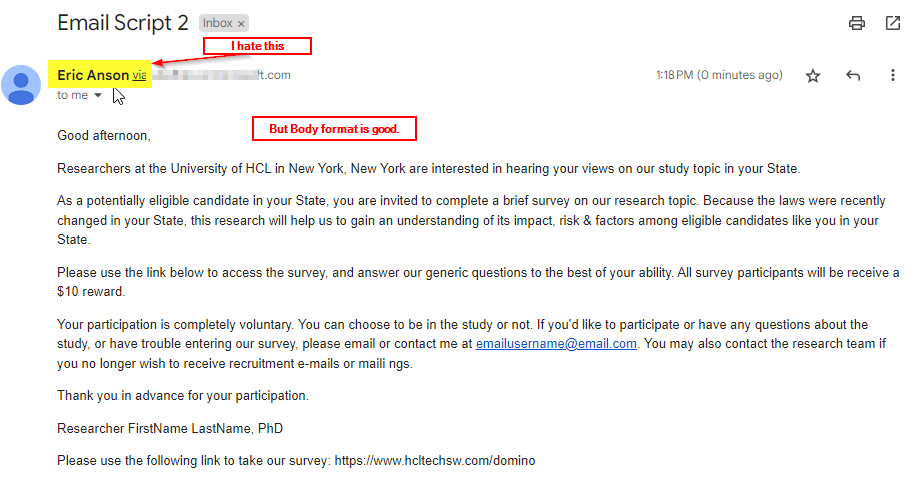
I created a 2nd Action button ("Email Script 2") that specifies explicitly where the hard returns should be, and this works great in properly formatting the msg when received, EXCEPT the sender name shows me as the sender, instead of the necessary Principal & From fields set in the code to come from shared mailbox.
Sub Click(Source As Button) On Error Resume Next Dim session As New NotesSession Dim workspace As New NotesUIWorkspace Dim db As NotesDatabase Dim view As NotesView Dim doc As NotesDocument Dim coll As NotesDocumentCollection Dim mailDoc As NotesDocument Dim emailField As NotesItem Dim principal As String Dim senderName As String Dim subject As String Dim body As String Dim startTime As Variant Dim endTime As Variant Dim waitTime As Long' Set the principal, sender name, and email content principal = "Custom Research Study <studyemail@email.com>" senderName = "Custom Research Study <studyemail@email.com>" subject = "Email Script 2" body = "<html><body><p>Good afternoon,</p>" & _ "<p>Researchers at the University of HCL in New York, New York are interested in hearing your views on our study topic in your State.</p>" & _ "<p>As a potentially eligible candidate in your State, you are invited to complete a brief survey on our research topic. Because the laws were recently changed in your State, this research will help us to gain an understanding of its impact, risk & factors among eligible candidates like you in your State.</p>" & _ "<p>Please use the link below to access the survey, and answer our generic questions to the best of your ability. All survey participants will be receive a $10 reward.</p>" & _ "<p>Your participation is completely voluntary. You can choose to be in the study or not. If you'd like to participate or have any questions about the study, or have trouble entering our survey, please email or contact me at emailusername@email.com. You may also contact the research team if you no longer wish to receive recruitment e-mails or mailings.</p>" & _ "<p>Thank you in advance for your participation.</p>" & _ "<p>Researcher FirstName LastName, PhD </p>" & _ "<p>Please use the following link to take our survey: <a href=""<https://www.hcltechsw.com/domino>"">https://www.hcltechsw.com/domino</a></p>" & _ "</body></html>" ' Get the current database Set db = session.CurrentDatabase ' Get the current view Set view = db.GetView("Batch_2") ' Get the selected documents in the view Dim uiView As NotesUIView Set uiView = workspace.CurrentView Set coll = uiView.Documents ' Loop through the selected documents Set doc = coll.GetFirstDocument While Not doc Is Nothing ' Get the email address from the "Email" field from Notes record Set emailField = doc.GetFirstItem("Email") ' Get the text value of the field Dim email As String email = emailField.Text ' Create a new mail document Set mailDoc = New NotesDocument(db) mailDoc.Form = "Memo" ' Set the sender, recipient, and subject mailDoc.Principal = principal mailDoc.SendTo = email mailDoc.Subject = subject mailDoc.From = senderName ' Create a MIME entity for the HTML content Dim mime As NotesMIMEEntity Dim stream As NotesStream Set mime = mailDoc.CreateMIMEEntity Set stream = session.CreateStream Call stream.WriteText(body) Call mime.SetContentFromText(stream, "text/html; charset=iso-8859-1", ENC_IDENTITY_7BIT) ' Set the "From" field after creating the MIME entity mailDoc.From = senderName ' Send the email Call mailDoc.Send(False) ' Pause for 5 seconds startTime = Now waitTime = 5 ' seconds endTime = startTime + (waitTime / 86400) ' convert seconds to days (1 day = 86400 seconds) Do While Now < endTime ' Wait Loop ' Clean up Set doc = coll.GetNextDocument(doc) Set mailDoc = Nothing Set emailField = Nothing Wend Msgbox "Emails sent successfully!"
End Sub
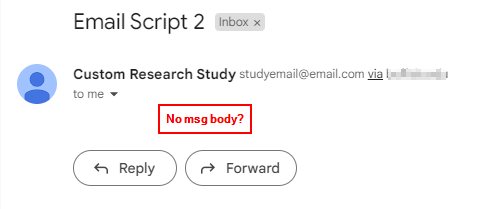
So "Email Script 1" does everything I want but it looks ugly when received (especially on mobile device). "Email Script 2" looks just like I want it to, but the Sender Name is personal and I want to mask it as another mailbox , just like Script 1 does so well. How can I become a happy person by getting the best format AND dictate the Sender Name? Below are images of the 2 different msgs as received in GMail: