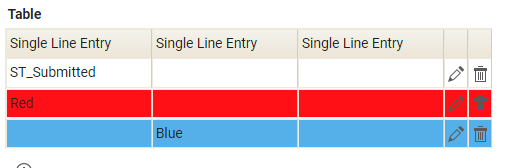
Can anyone see my mistake in the following; the goal is to find a value ('Red' or 'Blue') in any cell in the table and correspondingly colour the background colour of the both the pertinent cell and those cells adjacent, i.e., the entire row.
I have applied the custom class to the table however on function execution, nothing changes.
Many thanks
// Define some colours for table rows
app.getSharedData().specialBlue = '#60b1ee';
app.getSharedData().specialRed = '#ff0000';
// Apply dynamic background colour to entire rows in the table

app.getSharedData().applyTableStyle = function() {

// Get all rows in the table with class ‘dojoxGridRow’

let rows = dojo.query(‘.myClass .dojoxGridRow’);
// Loop through each row and check the cells inside
rows.forEach(function(row) {

    // Get all cells (td elements) in the current row with class 'dojoxGridCell'
    let cells = dojo.query('td.dojoxGridCell', row);

    // Flag to determine if we need to colour the row
    let rowColoured = false;

    // Loop through each cell to check for 'Red' or 'Blue'
    cells.forEach(function(cell) {
        if (cell.innerText === 'Red' && !rowColoured) {
            dojo.style(row, 'background-color', app.getSharedData().specialRed);
            rowColoured = true; // Stop further checks for this row once it's coloured
        }
        if (cell.innerText === 'Blue' && !rowColoured) {
            dojo.style(row, 'background-color', app.getSharedData().specialBlue);
            rowColoured = true;
        } // Close final if
    });
});

}; // Close function
Two things:
1. let rows = dojo.query('.myClass div.dojoxGridRow');
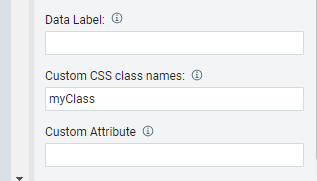
2. Make sure that you have defined "myClass" on the table:
Many thanks,
this works successfully with the 'Light grey' and 'Dark blue', themes however not with 'Flat Blue'; could you please advise the correct syntax?
Best regards
Strange, The sample I built and showed here was using the 'Flat Blue' theme. Send me your sample form (christopher.dawes@hcl.com).
OK, the problem is that the cell styles are overriding the row style that you are setting. There are other events that will override it as well (i.e. mouseover and mouseout events, etc).
I cleaned up the code a bit:
// Loop through each row and check the cells inside
    rows.forEach(function(row) {
    // Get all cells (td elements) in the current row with class 'dojoxGridCell'
    let cells = dojo.query('td.dojoxGridCell', row);

    // Flag to determine if we need to colour the row
    let rowColoured = false;

    // Loop through each cell to check for 'Red' or 'Blue'
    cells.forEach(function(cell) {
        if(rowColoured)
          return;

        var rowColor = "";
        if (cell.innerText === 'Red')
          rowColor = app.getSharedData().specialRed;
        else if (cell.innerText === 'Blue')
          rowColor = app.getSharedData().specialBlue;

        if(rowColor != "") {
          dojo.style(row, 'background-color', rowColor);
          rowColoured = true; // Stop further checks for this row once it's coloured
        }
    });

    // the cells will override any row styles, need to set them to 'inherit'
    if (rowColoured){
       cells.forEach(function(cell) {
         dojo.style(cell, 'background-color', 'inherit');
       });
    }
}); </code></pre>


You could also call the applyStyles function in the other table events to make sure the style stays applied even after the other events are triggered.