Hi Aleksandr,
I am running in Kubernetes. My values.yaml has :
jwtCookieDomain: ****.local (this matches my domain for sametime.****.local and meetings.****.local)
jwtAccessCookieName: sametimeJwt
jwtAccessCookiePath: /
jwtAppId: sametime
jwtRefreshCookieName: sametimeRefresh
jwtRefreshCookiePath: /meeting-auth/api/v1/refresh
serverHostname is the hostname of my meetings server and is resolvable per DNS from the sametime server and meetings.*****.local is resolvable from the sametime server.
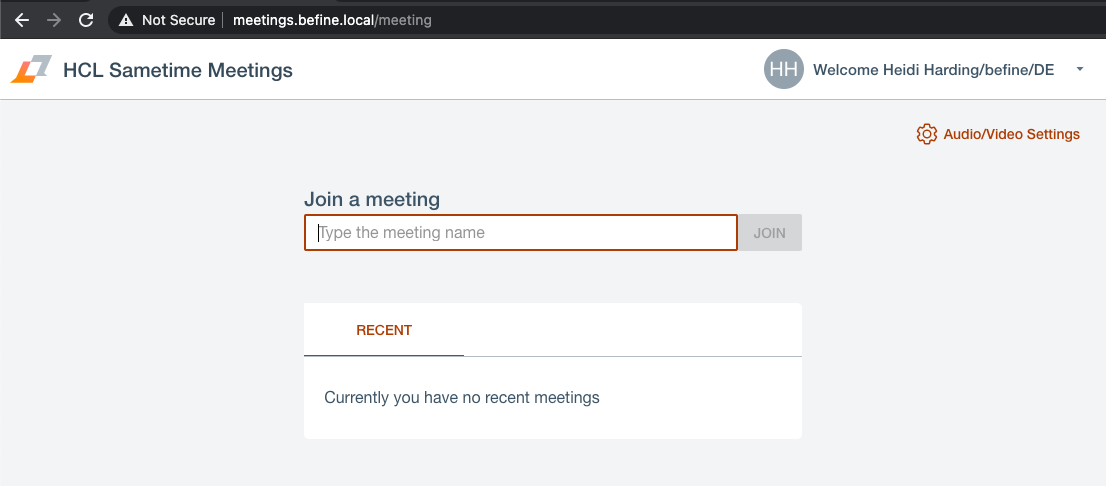
Meetings is letting me sign in, so certainly the sametime proxy server is responding fine. It just doesn't show an option to start a meeting, only to join an existing one.
I always use incognito mode/private window in the browser so that I am starting off with no cookies and no browser addons.
On the ST Proxy server I am seeing errors in the log relating to the user profile photo, however I expect this given the SSO with Connections and the LTPA token will no longer function.
Additionally I am seeing the following in the proxy log, which reflects my logins and the logout that is triggered when I click on the "login to sametime" link.
04-Nov-2020 19:52:17.531 FEIN [Catalina-utility-1] com.ibm.rtc.stproxy.servlet.STProxySessionListener.sessionDestroyed SID: [e5149e33-7d43-4cdf-9450-d72b83a3123c] user loginId: [7c6cd39e 0a2430ae] id: [CN=Heidi Harding/O=*******/C=DE]
04-Nov-2020 19:52:17.532 WARNUNG [Catalina-utility-1] com.ibm.rtc.stproxy.servlet.STProxySessionListener.sessionDestroyed session timed out, SID: e5149e33-7d43-4cdf-9450-d72b83a3123c, isMobileNativeClient: false
04-Nov-2020 19:52:17.534 INFORMATION [Catalina-utility-1] com.ibm.collaboration.realtime.stproxy.services.conference.ConferenceManager.removeConference conferenceList size: 0
04-Nov-2020 19:52:17.535 INFORMATION [Catalina-utility-1] com.ibm.collaboration.realtime.stproxy.services.community.CommunityService.logout send out to CS
04-Nov-2020 19:52:17.536 FEIN [Catalina-utility-1] com.ibm.rtc.stproxy.servlet.STProxySessionListener.sessionDestroyed SID: [264d8d88-cef8-4782-b1fb-1c11bc1be7f2] user loginId: [7c6cd39d 0a2430ae] id: [CN=Heidi Harding/O=********/C=DE]
04-Nov-2020 19:52:17.536 WARNUNG [Catalina-utility-1] com.ibm.rtc.stproxy.servlet.STProxySessionListener.sessionDestroyed session timed out, SID: 264d8d88-cef8-4782-b1fb-1c11bc1be7f2, isMobileNativeClient: false
04-Nov-2020 19:52:17.537 INFORMATION [Catalina-utility-1] com.ibm.collaboration.realtime.stproxy.services.conference.ConferenceManager.removeConference conferenceList size: 0
04-Nov-2020 19:52:17.537 INFORMATION [Catalina-utility-1] com.ibm.collaboration.realtime.stproxy.services.community.CommunityService.logout send out to CS
also this:
04-Nov-2020 20:01:36.285 INFORMATION [pool-1-thread-3] com.ibm.rtc.stproxy.services.ExecutorServiceManager.lambda$registerExecutorService$0 ThreadPool[pool-1-thread-3] registered for service[Status-Thread-Pool]
04-Nov-2020 20:01:36.285 FEIN [https-openssl-nio-8443-exec-3] com.ibm.rtc.stproxy.servlet.STLoginServlet.doLogin Storing login type: 5344
04-Nov-2020 20:01:36.289 INFORMATION [Chuck the postman's dispatching thread.1] com.ibm.collaboration.realtime.stproxy.services.community.CommunityService.callLoginService loginMethod: byPassword, SID: cc093a76-6500-4fd5-b74b-add32e669a46
04-Nov-2020 20:01:36.289 INFORMATION [Chuck the postman's dispatching thread.1] com.ibm.collaboration.realtime.stproxy.services.community.CommunityService.callLoginService lightLoginService invoked, SID: cc093a76-6500-4fd5-b74b-add32e669a46
04-Nov-2020 20:01:36.303 INFORMATION [Chuck the postman's dispatching thread.2] com.ibm.collaboration.realtime.stproxy.services.community.CommunityService.loggedIn (callback) loggedIn time: 14 ms, SID: cc093a76-6500-4fd5-b74b-add32e669a46
04-Nov-2020 20:01:36.305 KONFIGURATION [Chuck the postman's dispatching thread.2] com.ibm.collaboration.realtime.stproxy.services.buddylist.BuddyListService.handleBuddyListEvent info.buddylist.servic.available
04-Nov-2020 20:01:36.319 FEIN [Chuck the postman's dispatching thread.1] com.ibm.rtc.polled.DynacacheWrapper.get RealTimeSession[cc093a76-6500-4fd5-b74b-add32e669a46] not enabled for persistence, factory to create new RealTimeSession[cc093a76-6500-4fd5-b74b-add32e669a46]
04-Nov-2020 20:01:36.319 FEIN [Chuck the postman's dispatching thread.1] com.ibm.rtc.polled.DynacacheWrapper.get RealTimeSession[cc093a76-6500-4fd5-b74b-add32e669a46] not enabled for persistence, factory to create new RealTimeSession[cc093a76-6500-4fd5-b74b-add32e669a46]
04-Nov-2020 20:01:36.319 FEIN [Chuck the postman's dispatching thread.1] com.ibm.rtc.polled.RealTimeSessionFactory.createSessionFromId NON_REPLICATED_SESSION_MODE: Creating Stateful realtime session [cc093a76-6500-4fd5-b74b-add32e669a46]
04-Nov-2020 20:01:36.320 WARNUNG [Chuck the postman's dispatching thread.1] com.ibm.rtc.polled.DynacacheWrapper.fireEvent GRTPC0009W: Received invalidation event from an unknown cache [rtc4web].
04-Nov-2020 20:01:36.320 FEIN [Chuck the postman's dispatching thread.1] com.ibm.rtc.polled.RealTimeSessionFactory.getInstance Created new RealTimeSession[cc093a76-6500-4fd5-b74b-add32e669a46] ... we should only see this once per Id
04-Nov-2020 20:01:36.335 FEIN [Chuck the postman's dispatching thread.1] com.ibm.rtc.polled.DynacacheWrapper.get ... pulled from serialization, update controller added
04-Nov-2020 20:01:36.340 INFORMATION [https-openssl-nio-8443-exec-3] com.ibm.collaboration.realtime.stproxy.services.community.CommunityService.pollLogin clientId: 5344, total login time: 53 ms, SID: cc093a76-6500-4fd5-b74b-add32e669a46
Regards
Heidi