Hi there,
I have a rather simple issue that could be done manually but I need to know if it could be done automatically in a specific Note client account.
The idea is to automatically mark all "UnRead" emails of the $Inbox to a "Read" state after a certain condition happens, i.e. 1 week since recieved, etc...
I ran through the Rules but there is no way to treat this issue from there. It must be some routine running in the background to control this and issued only to certain Notes clients.
Regards and great work
A.Naberan
Hi Altor,
If you have a Domino Developer available, this can be done using LS code. Just get a handle to the Inbox folder and loop through all the documents in there. Check each document for the Created date and if its over the time length use the NotesDocument MarkUnRead method. This code could go into an agent and added to just those mail files you want it in
Thanks for you reply, but unfortunately I have no knowledge or used before "LS code", although I have Domino Developer installed.
Else there is any documentation available to auto-teach myself with this coding or any other way in doing so, I think this option for me is bit far away to be possible.
Regards,
Hi Aitor,
https://help.hcltechsw.com/dom_designer/11.0.1/basic/domino_designer_basic_user_guide_and_reference.html
This is the link to the Domino Designer Help file.
A couple of topics you will want to review. From the left panel Expand Application Design -> Creating an application->Adding automation to applications -> Agents for an overview of creating agents.
The other section you will want to look at is the LotusScript/COM/OLE classes. This talks about all the different LS classes we have available as well as examples on how to use them.
I happen to have an example of code that loops through the inbox you can use as a starting point for you.
Sub Initialize
Dim s As New NotesSession
Dim DB As NotesDatabase
Dim vw As NotesView
Dim doc As NotesDocument
Set db = s.currentdatabase
Set vw = db.getview("($Inbox)")
Set doc = vw.Getfirstdocument()
While Not doc Is Nothing
Set doc = vw.Getnextdocument(doc)
Wend
End Sub
You'll want to look at the NotesDateTime class and create 2 variables of the NotesDateTime type, one for the current date/time and one for the date/time the document was created(NotesDocument Created property). And then use the NotesDateTime class TimeDifference method to see its been more than a week or what ever interval we want to check and if so use the NotesDocument class MarkUnread method to mark it as unread and then the NotesDocument class Save method to save the change. There are examples of these calls in the above link.
Hope this helps!!!
Hi Aitor,
Please find the below article on Step-By-Step Troubleshooting Guide for Unread Read Marks issue.
https://support.hcltechsw.com/csm?id=kb_article&sysparm_article=KB0036056
Regards,
Sudhir
Thanks to all, I will see through the suggested docs.
Hi Aitor,
You can create a simple action scheduled agent by following below steps:
Open user's mail file.
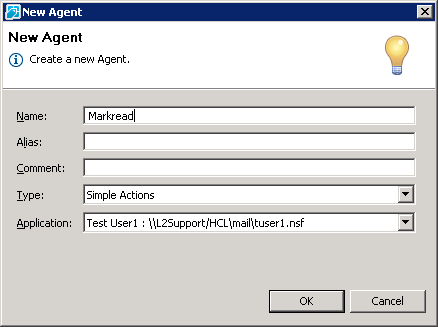
Create --> Agent --> Select 'Simple Actions'
Name the agent and click on 'OK'
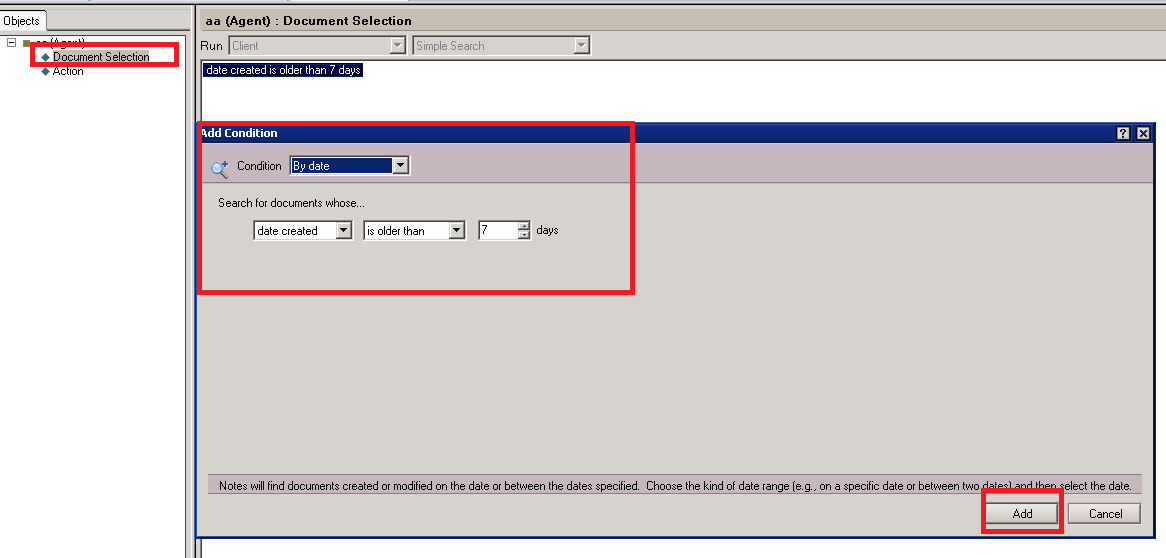
Click on 'Document Selection'
Click on 'Add' and select condition as below :
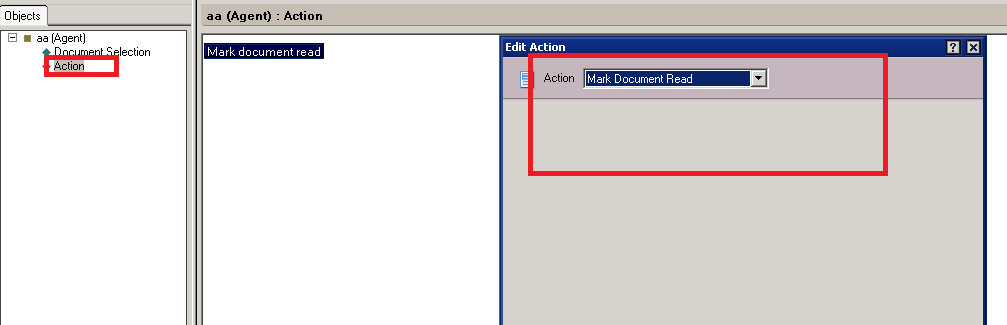
Click on 'Action' on the left pane, click on 'Add' and select as below :
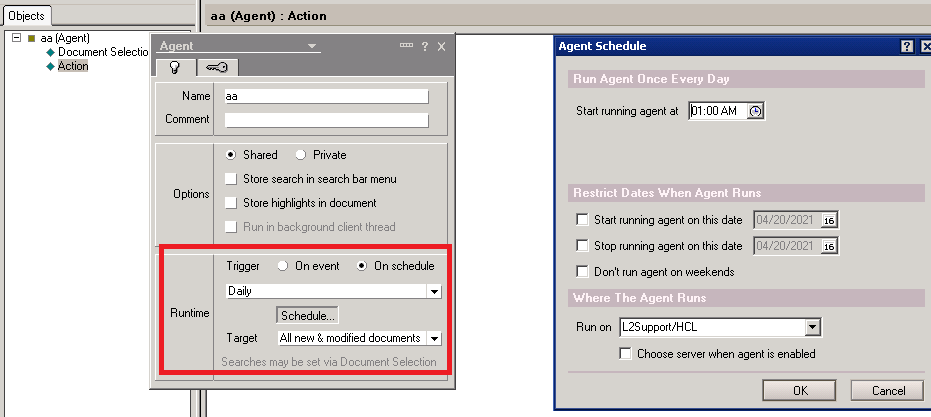
Go to Agent properties and select the agent schedule as below :
Click on 'OK' to save the agent.
Hope these steps helpful !!.
A.Naberan
Are the above steps (screenshots) helpful ?