I have a form with both and Editors and Authors field that allows either view access and / or editor access to the form.
I have a user listed in the Authors field and for some reason they are unable to edit the document. There is no error, the document will not change to edit mode. It appears to happen only for this one user?
The users name is entered into the authors field using "Address Dialog for Choices" so there should be no issue with formatting. Looking at the contents of the field shows their name only with other in the correct format.
Has anyone else had this issue and perhaps a resolution as I have checked everything I know and am stumped.
As per issue reported by you, it seems only one user is facing the issue.
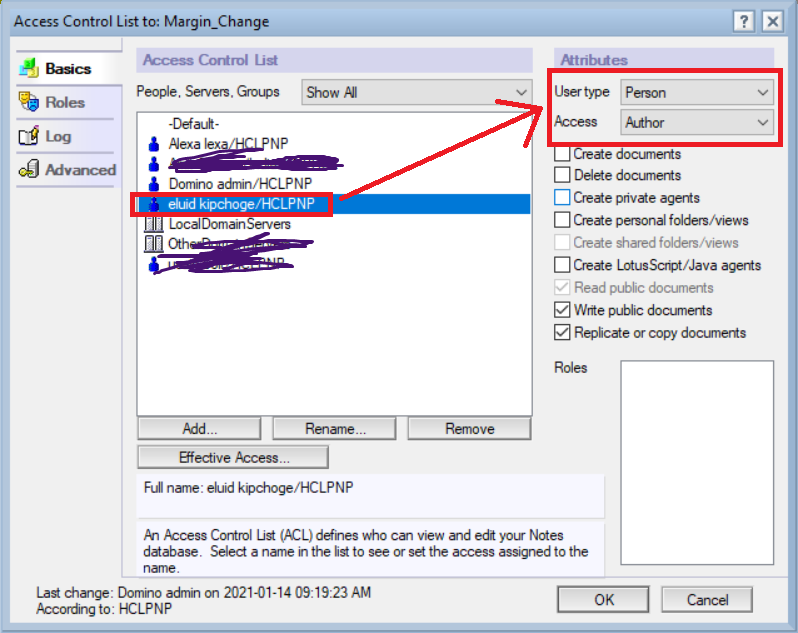
Can you please check what access is set in ACL for this impacted user?
Is it set as "Author" or something else? Refer to below screenshot.
Check the detailed information about "Readers"/"Authors" field's and how they exactly work.
Check if something is not being followed for this impacted user as per information as mentioned in this URL -->
https://support.hcl-software.com/csm?id=kb_article&sysparm_article=KB0037483
Regards,
Amit Sharma
Hi Philip,
For an affected single user, Please compare the User name in the Authors field of a document with the User name in File-->Security--->User security. The User name needs to be identical for the working of Authors field.