Dear Team,
I need one help. One of my application , single form but on that form many attachment fields.
Like Attachment1, Attachment2 and Attachment3.
I need the attachment names only in view columns , I am using the @AttachmentsName but problem is getting all attachments in a single column. Required Attachment1 in a single Column , attachment 2 is other column and attchment3 is third column.
Appreciate you if provide me a solutions.
Hi Ajeet
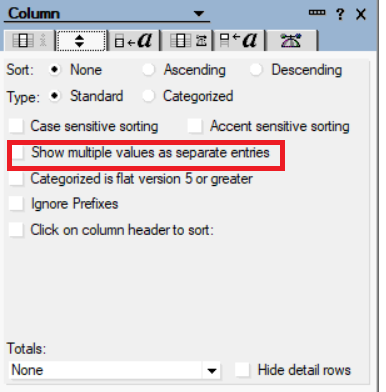
I don't think it is possible to show the each attachment in a separate column. Instead you can show as
separate entry for each attachment under column properties.
thanks for the revert but we have required each column.
The @AttachmentNames formula returns a list, meaning you can separate the list members into each column.
In the 1st column, you could have something like this:
ATT_INDEX := 1;
ATT_LIST := @AttachmentNames;
@If (ATT_LIST = ""; @Return(""); "");
@If (@Elements(ATT_LIST) < ATT_INDEX; @Return(""); "");
@Subset(@Subset(ATT_LIST; ATT_INDEX); -1)
For the 2nd column, use the same formula but replace "ATT_INDEX := 1"; with "ATT_INDEX := 2";
And so on for column 3, 4, etc.
And, instead of using @Subset(@Subset(ATT_LIST; ATT_INDEX); -1) you can probably get away with ATT_LIST[ATT_INDEX]
Hope this helps
If you need to know what attachment(s) by field the only method I'm aware to accomplish that is via Lotusscript. Here is a snippet of code that will take an array of field names and will create a matching set of new fields (attachment field name + "info") that contain the attachment information. You could then use those fields in your views. This code was used in the PostSave event of our form.
Given a list of attachment fields, will create new "Info" fields containing the attachment name(s) and attachment size(s) delimited by a "|".
	Dim doc As NotesDocument
	Dim arrAttachmentFields(1) As String
	Dim ritmAttachmentField As NotesRichTextItem
	Dim embedAttachments As NotesEmbeddedObject
	Dim arrFieldInfo() As String
	Dim iIndex As Integer
Set doc = Source.Document

arrAttachmentFields(0) = "AttachmentField1"
arrAttachmentFields(1) = "AttachmentField2"

Forall strFieldName In arrAttachmentFields
	iIndex = 0
	Redim arrFieldInfo(iIndex) As String

	Set ritmAttachmentField = doc.GetFirstItem(strFieldName)

	If ritmAttachmentField.Type = RICHTEXT Then
		If Isempty(ritmAttachmentField.EmbeddedObjects) Then
			Call doc.ReplaceItemValue(strFieldName + "Info", "")
		Else
			Forall objAttachment In ritmAttachmentField.EmbeddedObjects
				If objAttachment.Type = EMBED_ATTACHMENT Then
					Redim Preserve arrFieldInfo(iIndex) As String

					arrFieldInfo(iIndex) = objAttachment.Name + "~!~" + Cstr(objAttachment.FileSize)

					iIndex = iIndex + 1
				End If
			End Forall

			Call doc.ReplaceItemValue(strFieldName + "Info", arrFieldInfo)

			Erase arrFieldInfo
		End If
	End If
End Forall</code></pre>
Hi Ajeet Gupt,
We understand that you have multiple attachments in the "Richtext" field. You want to display each attachment in each column of the view.
The "@AttachmentNames" formula will give you the list of attachments. You can achieve this requirement by using "@Subset" and "@AttachmentNames" combinations.
Please refer to the following help documentation for more information.
Title: @AttachmentNames (Formula Language)
https://help.hcltechsw.com/dom_designer/10.0.1/basic/H_ATTACHMENTNAMES.html
Title: @Subset (Formula Language)
Refer -->https://help.hcltechsw.com/dom_designer/10.0.1/basic/H_SUBSET.html
Please refer to the following word document for more information. We hope this will solve your problem.
Thank you,
Regards
Display the attachment name in a separate column.docx
Hi Sridhar Ji,
Thanks for your replied. Code is perfect. but one problem attachments name can't distinguish which attachment belong from the which field. That's why attachment1 showing 2 and 2 showing 1 and 3 showing 4 .
Issue still not resolved.
Hi Ajeet Gupt,
We appreciate your quick response.
@AttachmentName formula will give the attachment name from the document level, not the individual "Richtext" field.
So we are sorry to say this, but the attachment names will not be displayed individually in each column from each field.
We already submitted the enhancement for this requirement.
Title : Enhance @Attachments, @AttachmentNames, @AttachmentLengths for individual RTFs
URL --> https://domino-ideas.hcltechsw.com/ideas/DDXP-I-432
Thank you,
Regards,
If you need to know exactly which file was attached to which RichText-field, @Formula code will not be good enough.
The list returned from @AttachmentNames can be in any order. Exactly how Domino orders the attachments is (for me anyway) unknown.
This means you must use LotusScript and have some code running on the Postsave-event in order to populate hidden fields in your document, just like the code David Morton supplied in his reply.
The only thing you need to do in that code to modify to your needs is this:
Change the line
Dim arrAttachmentFields(1) As String
so that the number in the brackets is the number of attachment fields in your form minus 1. By default indexes start at zero.
Change the lines
arrAttachmentFields(0) = "AttachmentField1"
arrAttachmentFields(1) = "AttachmentField2"
to match the attachment field names in your form.
And, if the code is running in the Postsave-event of the form, you must save the document too.
Call doc.Save(True, False)
If that code is run, you should have hidden fields in your document that you can use in your view.
For example, in the column listing attachments from the 1st attachment field you could have this
NAME_FIELD := "AttachmentField1Info";
@If ( !@IsAvailable(NAME_FIELD); "";
NAME_FIELD = ""; "";
"File: " + @Left(NAME_FIELD; "~|~") + " " + "Size: " + @Right(NAME_FIELD; "~|~"))
For the 2nd column, just change the field on the 1st line.
You need, of course, change the field name to match the ones in your form.
That should do it.
Hi Ajeet Gupt,
Please follow the instruction we have given in the word document and try to solve the issue.
We have tested in our test environment, the attachments are displaying in the column wise as workaround you can use it.
Thank you,
Regards,
Sridhar
Display the attachment name.docx