Hi colleagues.
Hope you're all doing fine.
I'm having several users reporting that type-ahead contacts are not working for them.
We have initially set a Desktop policy to disable type-ahead, which has now been enabled again.
According to the documentation, Desktop policy does not affect iNotes regarding this. This is just to provide some context.
Users are complaining that Verse is not providing type-ahead contacts for them.
My questions are:
If a user in iNotes has type-ahead disabled, will this be also disabled in Verse ?
If so, Is there any way that I can enable type-ahead in iNotes for all of our users ?
Just to confirm, type-ahead works only from new emails, right ? So, Isn't there any way to populate type-ahead from existing mails in user's mailboxes ?
Thanks in advanced for your help.
Sincerely,
Elvis.
Hello Elvis,
Most of the iNotes settings are adhered in Verse. Yes, Desktop policy settings "Disable type-ahead for all names and use the Notes Basic type-ahead" will not affect iNotes as documented in the below link.
https://help.hcl-software.com/domino/11.0.1/admin/conf_settinguptypeahead_t.html
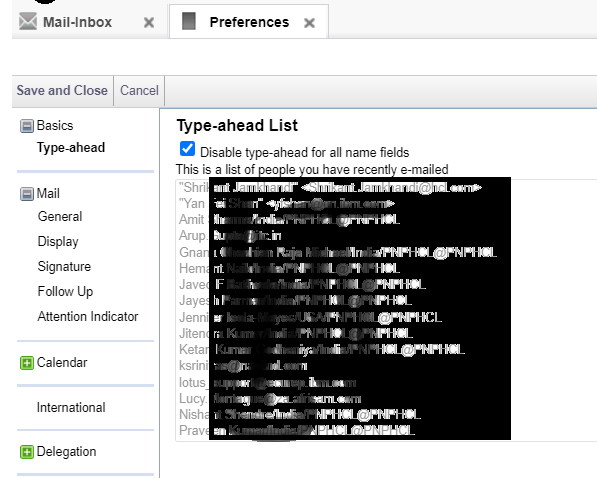
Verse uses the same recent contact list that iNotes uses (DIPS data in the profile note). The type-ahead feature in VOP will use the following data to display names:
1. Recent contact list
2. The sender names of emails that have been loaded in the message list.
3. Names of the people that appear in the Important to Me bar.
My comments.
- If a user in iNotes has type-ahead disabled, will this be also disabled in Verse ?
=> Yes, it will also be disabled in Verse.
If so, Is there any way that I can enable type-ahead in iNotes for all of our users ?
=> You may use a LotusScript to update the iNotesProfile item value "DisableDPABProcessing" to set as "0". This agent is created on your names.nsf (Domino Directory). You can take full access administrator access to run this agent. Note, in the agent properties the target should be set as "None".
You can select single person document or multiple person document to run this agent. Please have this tested in TEST environment first.
//////////////////////////
Example Script:
Sub Initialize
Dim db As NotesDatabase
Dim pos As Integer
Dim found As Integer
Dim servername As String
Dim mailpath As String
Dim mailowner As String
Dim inotesdoc As NotesDocument
Dim profilecollection As notesdocumentcollection
'PARAMETERS TO CODE
'Indicate mail subdirectory name
mailpath = "mail\"
'Server name (in canonical format e.g CN=Server/O=Acme):
servername = "Domino1/Acme"
Dim dbdir As New NotesDbDirectory(servername)
'Cycle through databases on the server
Set db = dbdir.GetFirstDatabase(DATABASE)
While Not db Is Nothing
'Skip databases which you don't have access to
On Error 4060 Goto Error4060
'Check to see if this database is in the mail directory
pos = Instr(db.FilePath, mailpath)
If pos = 1 Then
Call db.Open(servername, db.FilePath)
Set profilecollection=db.GetProfileDocCollection("iNotesProfile")
If profilecollection.Count>0 Then
Set inotesdoc=db.GetProfileDocument("iNotesProfile")
If Not inotesdoc.isnewnote Then
inotesdoc.DisableDPABProcessing="0"
Call inotesdoc.save(True, True)
End If
Delete inotesdoc
End If 'If profilecollection.Count>0
End If
GetNextDb:
Set db = dbdir.GetNextDatabase()
Wend
Exit Sub
Error4060:
'If the code reaches here then the user does not have access rights.
Resume GetNextDb
End Sub
////////////////////////////
Just to confirm, type-ahead works only from new emails, right ? So, Isn't there any way to populate type-ahead from existing mails in user's mailboxes ?
=> The list will picked from the "DIPS data in the profile" in the mail file. If the settings is disabled as below but, if you have data in this profile in the item "DPAB" which will contains all the recent contact list. When re-enabling the setting should use all data what it has already in it for Verse and iNotes.
Thank you.
Regards
Shrikant J
Hi,
sorry for digging out this old thread but the recent contact list for VOP being saved in iNotes might be obsolete, right?
Since VOP now seems to have its own type-ahead list.
Where are the type-ahead entries stored in VOP 3.x+?
In verseprofile (in users mail file) there is a text list ExcludedRecentContacts but I cannot find a RecentContacts or similar.
Regards,
Florian