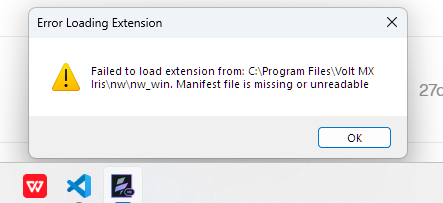
I have installed Volt Iris v10, and I am facing a couple of issues:
a. IRIS is not able to grab its application icon via the pinned icon. So, I have to manually search for Iris in the Windows Search bar, and then only the application loads.
b. When I try to zoom-in into a file (via the editor), it only zooms the numbering bar, whereas the code/text remains at the same font-size. This works fine for the form viewer.
I am hopeful that these would be fixed in the coming patch updates/fixes.
Hi @VersatileVats thank you for your post. Are you able to provide the steps to reproduce these issues? We can investigate them if you are able to provide the reproducible steps. Thank you!
The initial manifest error is coming since I upgraded to Iris v10; that’s it.
While for the zoom issue for the code files, you can yourself try zooming in the code files in Iris, and you would see that the code text is not zooming in/out, just the line numbering for the files is increasing.
Hi @VersatileVats, thank you for your reply. We have seen the extension error in previous cases, and it was resolved by changing the Workspace folder to a different directory. Please test with creating a new Workspace folder to see if this resolves the issue.
For the zooming issue, it is still not clear exactly how you are reproducing the problem. Are you able to provide specific steps for how you are zooming, and to which files you are referring? Are you choosing a menu item for zooming in or out? Are you using a keystroke? Are you changing the screen resolution, or specifically zooming with other steps? Also, in which file(s) do you see this behavior? Do you see the problem in form controllers or other files? Are you able to reproduce this behavior with any file or module? Thank you!