Hi there,
have a question concerning Notes 11. We have an application that starts an agent on the local machine. This agent prints every 2 seconds into the status line, so that one can see the progress and the estimated runtime.
But now in Version 11 there is no more such output in the status line and while the agent is running there is also no chance to open the new status line output window. Is there any other way to show the user the current progress and estimated runtime of the agent ?
If I run the agent from within the designer, it still works, but if an agent gets started in LS in the client then the status line seems to be no more option ?!?!
Jochen "Joe" Herrmann
Hi Jochen,
I did a quick test by running a LS agent on Notes client 11.0.1 and the agent is able to print into status bar. I have no problem in printing into status.
Is the problem specific to single Notes client or you are able to reproduce it on multiple Notes clients ?
Can you try basic troubleshooting steps like renaming workspace folder and/or removing cache.ndk file ?
Hello Joe!
When you said "status line", you're referring to the Status Bar on the bottom of Notes Client?
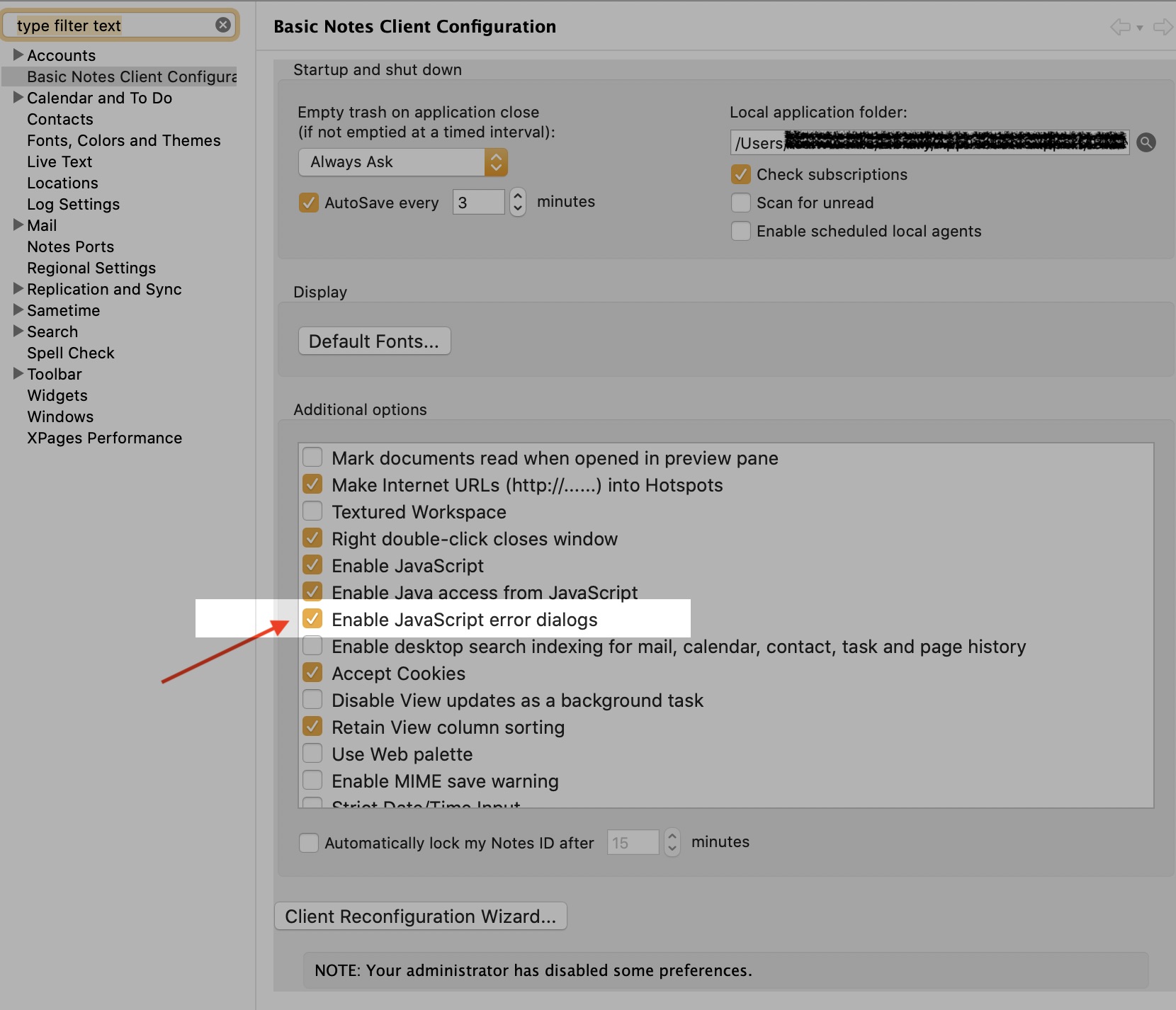
If yes, the only available option related to information on the Status Bar is to Enable/Disable JavaScript errors to be presented.
Try to disable/enable this option under Notes Client Preferences then check if the information related to your agent is presented:
Regards!
Rodrigo de San Vicente
Staff Software Engineer
Collaborative Workflow Platform
Thanks for your replies.
Rodrigo, I switched, as you suggested, the Javascript Error Option on and off, , but unfortunately it didn't help whether on or off.
Abhay, I think I explained not precisely enough. The agent, if started in the Designer or from within the client menu runs with output in form of a status line printed into the status bar or in the new notification window (theme 11). No problem here.
But in our case the agent gets started in a LS method in a forms action button :
If doc.importtyp(0)="Plan" Then
Set agent = db.getagent("ImportPlan")
Else
Set agent = db.getagent("ImportBeginne")
End If
agent.run |
In this case the agent prints disappears forever in the Nirwana. As this agent can run up to 20 minutes (daily import data from a client) the user, who imports it, wants to see that it's running and how long it probably will take. That's why we printed these status lines. But now we dont get them any more; only our email log of course - at the end.
No, unfortunately we can't put it on a server for certain reasons, but it's running on a VM.
I have tested it on both, the VM and my PC.
Jochen "Joe" Herrmann
IT Rechtsschutz/ BI/SAP/Groupware | IT | ROLAND Rechtsschutz-Versicherungs-AG | Deutz-Kalkerstraße 46, D-50679 Köln | http://www.roland-rechtsschutz.de
Joe, I understand your scenario now. This behavior is working as designed and it is not a bug. When an agent is called using Run method then it will not execute UI functions like Print and Messagebox. However, the Print/Messagebox would still log the messages in the log.nsf. If you check the log.nsf then you should see those messages there.
As an alternative, instead of calling agent, you can write functions in the LS library and then call them in Action button something like this...
If doc.importtyp(0)="Plan" Then
Call ImportPlan() 'ImportPlan will be a function in LS library
Else
Call ImportBeginne() 'ImportBeginne will be a function in LS library
End If
You would also need to call LS library in the Global section of the Form inside Options before calling functions.
Example : Use "LSLibraryName"
![]()
I have checked by calling function in LS library from action button and it is printing message on status bar.
I hope this helps.
Hello Abhay,
we use Agent.Run and not Agent.RunOnServer, thus the NotesUIWorkspace is available in such a kind of agent. This means it's not an backend agent. In Notes 9 it is still possible to print into the status bar, tested it with a colleague today. Still need to test now Notes 10, though.
If the agent library is used from a LS-Script in a button, Notes will be completely blocked for the entire processing time of the process. In this case around 20 minutes ...
Jochen "Joe" Herrmann
Hi Joe,
I did some more tests on v9.x, v10.x and v11.x.
On all versions I have found the same behavior of agent.run method i.e. it does not print into status bar.
When we run agent using LS Run method, it is actually running in the background and hence it can't execute UI function Print. If we run same agent from Action menu instead of Run method then it runs in foreground and can execute UI function Print.
If calling LS library function from action button might block Notes, then how about calling these functions from an agent and then calling this agent (from action button) under the property "Run in background client thread" in Agent properties. Enabling this agent property "Run in background client thread" will not block Notes as agent will run in the background on client. However, note that agent with this property enabled and if agent references front end classes, then user will receive run-time error.
More about this agent property in point # 8 in below given link.
https://help.hcl-software.com/dom_designer/9.0.1/appdev/H_CREATING_AN_AGENT.html
Hello Abhay,
thansk a lot for your tests. After I have read what you have writtten, I tested the following code snippet in the agent:
|
Dim ws As NotesUIWorkspace
Dim isBackend As boolean
Dim t$
isBackend=false
On Error GoTo isNoUI
Set ws = New NotesUIWorkspace
On Error GoTo 0
GoTo Proceed
isNoUi:
isBackend=True
Resume Next
Proceed:
If isBackend Then
t$="Running in Backend mode !"
Else
t$="Running in Frontend mode !"
End If
v=WS.Prompt(1,"Test in an Agent",t$)
|
| |
| |
and the Prompt window appeared on the screen - no error . The existance of NotesUIWorkspace is for me the one and only indicator for as session being in the backend or not.
You mention the run in "Run in background client thread" option. This was a good point and thus I have just now thrown an eye on it. For whatever reason is this option greyed out. Maybe because we uses long long ago the same agent triggered in a daily frequency also on the server, . But this is no more. Therfore I will turn it now into a pure local running non-periodic agent and will test again The agent library is compatible with both front- and backend sessions.
Thanks again for your help.
Jochen "Joe" Herrmann
Hello Abhay,
the problem arose from a misunderstanding with a user on our side. The user used a different button to activate the agent. This button used an AtCommand([toolsRunMacro]... and not a LS agent.run. So, of course, he could see the prints in the Statusbar, what he then reported to me. So it was absolutely correct, when you wrote that the agent can't print when started with the LS command Agent.run in Notes 9-11.
But this caused now also some questions appearing about the handling of local LS Agents:
1. In general, whenever the NotesUIWorkspace can't be opened in a session, it is/was consindered to be a backend session by me. Is this rule still valid ?
2. As in the local agent.run situation the agent could open WS, even show a messagebox, but could'n print into the status line, the question is, which actions are valid here ? What else does not lead to the desired results and need to be processed by a work around.
2. How can an agent itself detect, whether its running as a local backend or a local frontend agent ? I usually try to write code as generic as possible and the code thus needs to determine in which kind of session its running.
3. What happens with the Prints in local agent.run agents, that can't print into the statusline ? AgentLog? or ?
Thanks for your help & patience
Jochen "Joe" Herrmann