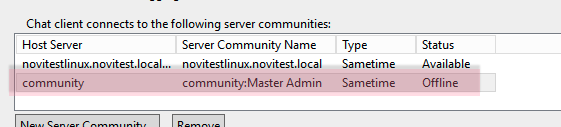
Hello,
i know this should be fixed with Version 12.0.1 FP1, but i still have the problem.
https://support.hcltechsw.com/csm?id=kb_article&sysparm_article=KB0099003
If i log from sametime client (Notes or Connect, not browser), it creates automatically a second community called "community" with host "community".
This happens on podman installation - not on docker.
If i delete the community and relogin, the community will be created again.
This is awful because sametime sso will get an error not able to login to the orphaned community and users are confused about the second icon/community.
Has anyone the tried to use sametime with podman ?
Hello
This happens sometimes also on Sametime 12.0.1 FP1 on Docker. Don't know under what circumstances.
It's awful also because the contact lists get messed up.
Regards
Patrice
Let's check your docker-compose.yml file and insure that there is a value (in the Community section) set for
STI__Config__ST_COMMUNITY_ID
the default here would be to match the hostname set in custom.env - so it should look like --
- STI__Config__ST_COMMUNITY_ID=${REACT_APP_MEETING_SERVER_HOSTNAME}
If that is not there - than during the upgrade to 12.01 FP1, the older docker-compose.yml file must have been kept and not over-written.
Seperately - one of the difficult things with this is that once an 'extra community' get stored with the users buddylist - it will come back from user storage even if the server configuration is correct. Deleting it from the client should take care of that.
Hello
In docker-compose.yml we have STI__Config__ST_COMMUNITY_ID=sametime.company.com.
In custom.env we have REACT_APP_MEETING_SERVER_HOSTNAME=meetings.company.com.
This is working fine and allows different URLs for chat and meetings. The 'extra community' can be removed by performing "Reset user" and deleting the community "community". But sometime later it reappears. I can't tell under what circumstances.
Regards
Patrice