I have a Dev/Test server that has been running for year or so, but has been suffering from occasional (once a week or so) crashes). Looking at the logs, it always crashed at the top of the hour (usually, but not always, 2:00am) just after AdminP looked for jobs to do.
Since disabling AdminP three weeks ago there have been no crashes. What might cause AdminP to cause the server to crash?
Thank you, Rajneesh. Such logs are what pointed to AdminP in the first place. There are no agents scheduled to run at this time.
The reason I asked the question is that while I am astonished that AdminP would cause such a problem, that is where the evidence points. While I do not entirely rule out other causes, what I am looking for is clues as to how it might do so, assuming it is the cause.
There could be so many reasons for server crash. That it is linked to AdminP seems to be clear from your analysis. AdminP could crash the server for various reasons like memory issues , deadlocks, high activity and virtually any reason that can crash the server.
Usually a test server tends to be a repository of multiple copies of databases with scheduled agents. also have a look at any enabled programs scheduled to run near the crash time.
Pinpointing the particular reason in your case may be a long drawn process. have a look at the following link and see if it helps:
Based on your update, I understand that the HCL Domino server is getting Crashed while Adminp request is getting processed and mostly you observed this issue at 02:00 AM server time.
By default, at the time of Domino server crash, the Domino server run NSD and collects crash NSD with realtime data at the time of Domino server crash.
The Domino crash issue need the investigate with Combine analysis of Crash NSD logs along with Console log and SEMDEBUG logs captured at the time of issue.
For the Domino crash issue, I would like to request you to please collect the crash NSD log along with the Console log and SEMDEBUG logs and raise a (Service Now) Ticket with HCL Support team.
The HCL Support team will analyse the respective logs and share the finding along with possible cause and suggestions.
I hope the above information will help in guiding you in proceed with further investigation on investigation of Domino server crash issue.
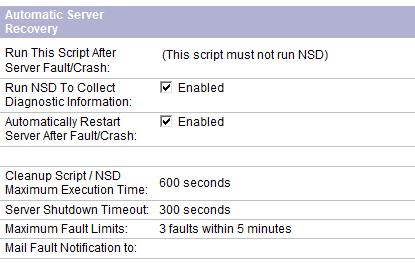
I wish I had a .nsd file to send you, but none is produced. There have now been a couple of new crashes in the last couple of days. There is no obvious trigger in the server log. The server is configured to run NSD on crashing, and then to re-start. Neither of these is happening.
- if there are programs documents that are scheduled to run during some hours
- have you enabled userlicenses, as far as I can remind the user licenses are calculated/aggregated on the admin server of the domain and admin is in charge of that (ghost documents you cannot see)
- check in admin4.nsf if any request can be run according to server adminp configuration. probably a document that access acl or something else can explain as it is a dev server, shut it down, backup admin4.nsf (remove it from the data directory) and restart domino to have a fresh admin4.nsf database (take care, the replica ID is the same so put the OLD admin4.nsf outside of data)
There are ServerTasksAt lines are for Catalog, Updall and Statlog, but none of the times correspond to crash times. There are no program docs configured, and user license counting is not configured. Bear in mind that AdminP is now not running. After turning it off we had no crashes for three weeks, but now they have started again.