The latest in my never-ending series of questions on ID Vault...
Just configured a new ID Vault on production server (Domino 12.0.0FP5 on Windows/2022 10.0)
All appears to have gone smoothly. I am configured as vault administrator and password changer.
BUT:
I am not offered in the directory the ability to upload ID files. Nor is my colleague, who has all the same vault rights and in addition is a domain administrator, as I am not.
Can anyone suggest what we are overlooking?
Hello.
ID Vault Administrators can upload user IDs.
I don't know the cause, but please check the following settings.
- Domino Administrator -> Configuration tab -> Security -> ID vault view -> Open ID vault setting document -> [Vault Administrator] field.
- "Auditor" role in the ACL of ID vault database (Not required, but should be set for administrators)
- "LocalDomainAdmins" group in the domino directory (Not required, but should be set for administrators)
By the way, what error do you get when you upload my ID file to the vault?
Regards,
Shigemitsu Tanaka
"ID Vault Administrators can upload user IDs"
That's what I thought, but I can't (and neither can my colleague, who is a member of LocalDomainAdmins). Hence my question.
I can manage the vault - add and remove vault administrators and password changers - but cannot load IDs.
I have given myself [Auditor] role, with no effect (even after client restart).
I get no error, for when I right-click on a name in the directory (including my own) I do not even get the "Upload ID Files to ID Vault", so I cannot even start the process.
Andrew, for your awareness, we have launched a new Digital Solutions Community site (https://developer.ds.hcl-software.com/) which includes our new product forums.
The content for our legacy product forums will soon be migrated to this new site. If you haven’t yet done so, we encourage you to sign up on the site and engage with the community of experts for our products!
----------------
On this forum thread for this question, you said you get no error, for when you right-click on a name in the directory (including my own) you do not even get the "Upload ID Files to ID Vault", so you cannot even start the process.
Is this option is not seen in Domino Administrator client and in Notes client too?
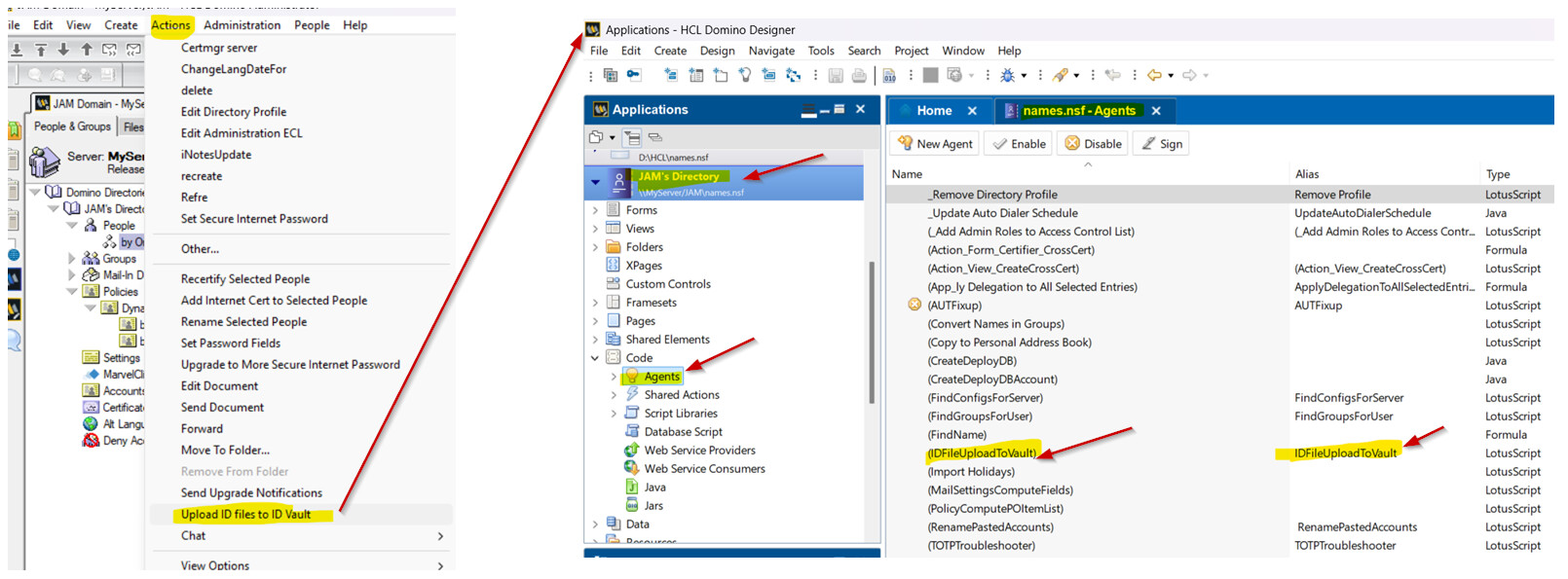
Check if the Domino Directory (names.nsf) Design is based on12.0.x as the "Upload ID Files to ID Vault" is an agent in the Domino directory. Check if the agent is seen under "Others" in the Action menu.
Also, please check if the option is seen when you switch to "By Organization" view instead of "People" view.
Thank you
Regards
Shrikant J
Thank you, Shrikant. I have bookmarked the new community page and will post future questions there.
As for your suggestion, it looks spot on. The template on the production server is 9.0.1, so a design replacement will probably fix our problem.
The only thing that bothers me is that you say the "Upload..." process is an agent. In the directory on the test server, where ID Vault is now working fine, and the upload process works, I cannot see any such agent. I have manager access there.
I should say, too, that I do not get the Upload option in the Admin client on either directory (test or production) I do get "Scan Vault" and "Extract ID..." on both, so I suppose those are no agents but features of the client, as I assumed "Upload..." was.
I will start to take steps to upgrade the production directory, but would be happier about it if I understood first why I cannot see the agent, if it is part of the 12.0.2 design template.
Thank you Andrew for your update.
The option which you in Action Menu "Upload ID Files To ID Vault" is a LotusScript agent in the Domino directory as shown below and this agent is only available when the Domino directory design is based on 12.0.x.
Q: I do get "Scan Vault" and "Extract ID..." on both, so I suppose those are no agents but features of the client.
A: This is correct these features are of Domino administrator client.
Thank you and let me know how it goes.
Regards
Shrikant J
Many thanks. Since it appears in the "Actions" menu I did not look among the parentheticised names. It is there, though, in DEV/TEST, and not in PROD, so I am certain that a template upgrade is all we need. That is the insight I was looking for.