This category is for webinars, user groups, meetups etc relevant to customers of HCL products. There is a minimum trust level before you will be able to post here. If you need access, please post in Site Feedback.
For those who can create Events:
Navigate to the Events category in the left-hand nav.
-
In the top left corner of the calendar, click New Topic.
-
Enter the Event Title in the “Type title or paste a link here” field
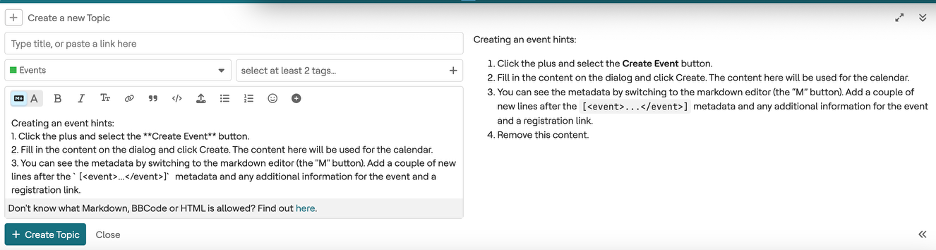
Ensure the correct tags are added to the post. The tag will change the event color on the calendar:
• “corporate”, for HCL webinars etc
• “openntf” for OpenNTF-run events
• “user-group” for User Group events
- Add at least 2 tags; one or more for products and one that will color code the entry.
- Add any details in the text box.
- To add the Event to the calendar you need to also open the Create Event dialog box by clicking on the
 sign on the Text Formatting menu. Choose Create Event.

- Add the date and time, Event Name, and any other details. Note that the Event name entered here is what will appear on the Calendar.
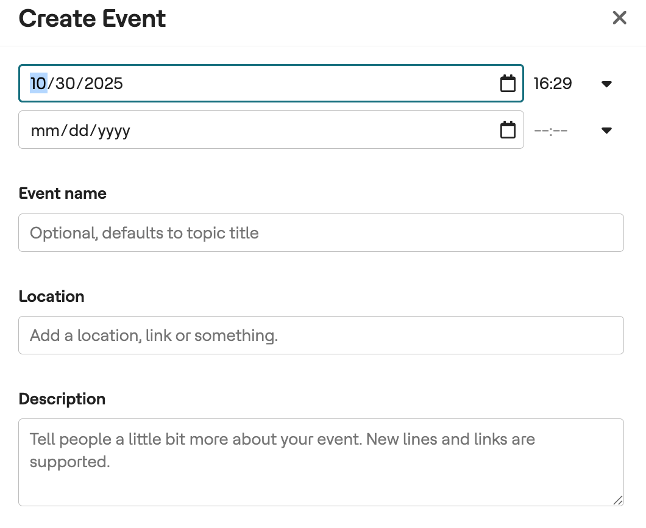
- When finished entering the info, click Create.
- Remove the prompt text and click Create Topic.
The event should appear on the Calendar view as well as below in the Event List view.