Domino/Notes Version: 14.5.1
Operating System: Windows 11
Client: Notes
Problem/Query:
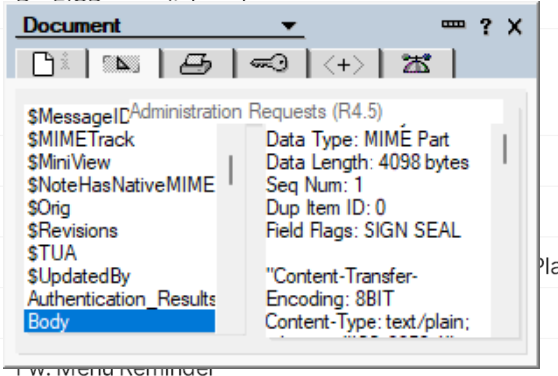
Anybody seeing UI corruption and/or having difficulty selecting document fields when bringing up the database/document properties dialog box from any view?
Example below - note the ‘Administration Requests (R4.5)’ field showing incorrectly.
Also, it isn’t possible to click on any field, instead I have to use the tab key to take the focus away from the ‘Administration requests’ field into the field selector box, then use Up/Down arrow keys to select the field for display.
Seems to be a new problem in 14.5.1. Wasn’t an issue in 14.5 FP1.
Happy to raise a support request with HCL, but thought I’d check here first in case there’s an easy fix.