I have a user that when logs in to Verse on Premise, their in-box shows nothing!
But when one of he filters is applied, i.e. "Needs Action", the view changes to show only those e-mails needing action.
They can also be seen in other folder views "Drafts; Sent; All Documents & folders", just not the In-box.
However, if the user shifts the UI to iNotes, everything can be seen in the in-box, no issues are shown.
I have replicated this behaviour using web browsers on my machine, so it's not caching; cookies or a web browser issue.
Other webmail users in my organisation are all okay.
I have done fixup; updall & compact on the mailbox.
Any ideas anyone?
Best regards
Richard.
Hi Richard,
Greetings!
Is there any error message display on the screen?
For HCL Verse Mail files require a design derived from the mail9FP9.ntf template or a later version. Please find the below article for more details.
https://support.hcltechsw.com/csm?id=kb_article&sysparm_article=KB0068895
Please Check the user mail file template version if it's older than mail9FP9.ntf then replace with the latest available template.
Regards,
Sudhir
Hi Richard.
Have you recently changed user’s mail template? Please give a look to @Sudhir suggestion.
Verse relies a lot on indexes.
Please verify user’s mailbox has FTI created; if existing, maybe it got corrupted. Try re-creating the FTI and try again.
That happened exactly to a couple of users, and re-creating FTI did the trick.
Check also ODS version and update to latest if possible.
Sincerely,
Elvis
Hi @Richard Mansell !!
I'm not sure If I understood what is happening there, maybe if you upload some screenshots showing what's being displayed in the users' interface, we can understand better...
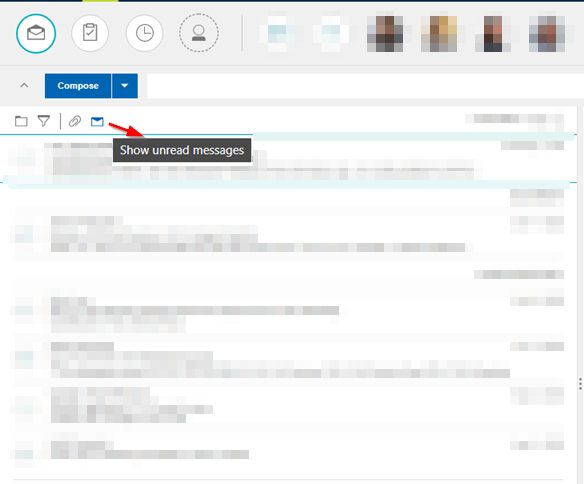
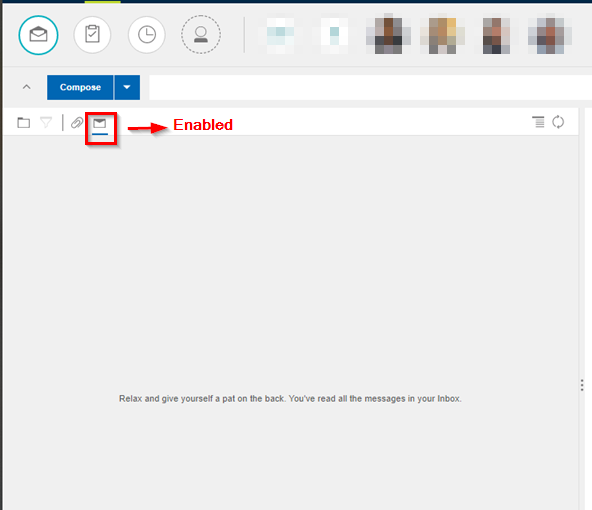
But in addition to the suggestions from Sudhir and Elvis, have you already checked whether the button "Show unread messages" is enabled or not?
When this option is not enabled all messages are displayed (default), however if the user clicked on it at some point, the read messages will not be displayed on the UI. Take a look at the test I did, showing images from the UI with the button disabled and enabled:
Please mark this question as answered and helpful if your issue is resolved. So that you can also help other community members who are facing the same issue.
Best Regards
Wiliam Dias
Hello all
I've prepared a load of screen shots for you.
Also, I've already checked mail template [Std R11.0.1] and ODS is at 53 - it's the same as all the other mail templates.
Last two screen shots.