Dear all, I am trying to roll out the FP2 Update to our clients. But the installation always failed with error 1603 (general error).
Anybody knows how to do an unattended installation?
Here is the last part of the logfile:
Action ended 15:07:58: ISSetupFilesExtract. Return value 1.
Action start 15:07:58: AppSearch.
Action ended 15:07:58: AppSearch. Return value 1.
Action start 15:07:58: CheckForProcessesRunning.
Process Check: at least one of process running
Process Check: notes2.exe running
Process Check: notes2
ProcessMessage rc:  0
IsLibraryLoaded
IsLibraryLoaded - process running NLNOTES.EXE associated with nnotes.dll
Process Check: one of notes dlls in use - process NLNOTES.EXE
CustomAction CheckForProcessesRunning returned actual error code 1603 (note this may not be 100% accurate if translation happened inside sandbox)
Action ended 15:08:04: CheckForProcessesRunning. Return value 3.
Action ended 15:08:04: INSTALL. Return value 3.
MSI (s) (70:58) [15:08:04:087]: Product: HCL Notes Client Update Installer -- Installation operation failed.
Please check Task Manager and close all Notes processes (everything that match "n***.exe"). Then try again.
Have you used Run As Admin to launch installer?
yep. no *notes* runnig, also tried as admin. Same result
Hi,
As per the error, it seems the process check identified that the notes processes are still running during installation.
Process Check: at least one of process running
Process Check: notes2.exe running
Process Check: notes2
ProcessMessage rc:  0
IsLibraryLoaded
IsLibraryLoaded - process running NLNOTES.EXE associated with nnotes.dll
Process Check: one of notes dlls in use - process NLNOTES.EXE
Please go to the "Details" tab in Task Manager. Just verify the Notes running processes.
notes2.exe
nlnotes.exe
If you find running, Select the Notes processes and click "End Task" and then confirm to "End Process".
OR
You can run NSD -kill to close all Notes Process using Command prompt.
1. Open Command Prompt
2. Navigate to Notes program Directory (Example: C:\Program Files (x86)\IBM\Notes\)
3. Run command nsd -kill
4. Wait to complete the command.
This will kill all Notes related processes in the background. Please try to disable antivirus temporarily.
Once it's done, you can run the below command (using command prompt run as Administrator) to run the silent installation.
>Notes_1101FP2_Win.exe -s -a /s /v"/qb+"
If you still having the same issue, please share the complete log file.
Thanks & Regards
Hemant Naik
HI, sorry for the late reply.
But those parameters dont work for me. The installation runs over 40min, so i canceld it. then i tried to use the parameters on the msi file. see log attached:
=== Logging started: 08.12.2020  08:31:53 ===
Action start 08:31:53: ADMIN.
Action start 08:31:53: WindowsFolder.68B7C6D9_1DF2_54C1_FF1F_C8B3B9A1E18E.
Action ended 08:31:53: WindowsFolder.68B7C6D9_1DF2_54C1_FF1F_C8B3B9A1E18E. Return value 1.
Action start 08:31:53: SystemFolder.68B7C6D9_1DF2_54C1_FF1F_C8B3B9A1E18E.
Action ended 08:31:53: SystemFolder.68B7C6D9_1DF2_54C1_FF1F_C8B3B9A1E18E. Return value 1.
Action start 08:31:53: WindowsFolder.9BAE13A2_E7AF_D6C3_FF1F_C8B3B9A1E18E.
Action ended 08:31:53: WindowsFolder.9BAE13A2_E7AF_D6C3_FF1F_C8B3B9A1E18E. Return value 1.
Action start 08:31:53: SystemFolder.9BAE13A2_E7AF_D6C3_FF1F_C8B3B9A1E18E.
Action ended 08:31:53: SystemFolder.9BAE13A2_E7AF_D6C3_FF1F_C8B3B9A1E18E. Return value 1.
Action start 08:31:53: WindowsFolder.63E949F6_03BC_5C40_FF1F_C8B3B9A1E18E.
Action ended 08:31:53: WindowsFolder.63E949F6_03BC_5C40_FF1F_C8B3B9A1E18E. Return value 1.
Action start 08:31:53: SystemFolder.63E949F6_03BC_5C40_FF1F_C8B3B9A1E18E.
Action ended 08:31:53: SystemFolder.63E949F6_03BC_5C40_FF1F_C8B3B9A1E18E. Return value 1.
Action start 08:31:53: WindowsFolder.98CB24AD_52FB_DB5F_FF1F_C8B3B9A1E18E.
Action ended 08:31:53: WindowsFolder.98CB24AD_52FB_DB5F_FF1F_C8B3B9A1E18E. Return value 1.
Action start 08:31:53: SystemFolder.98CB24AD_52FB_DB5F_FF1F_C8B3B9A1E18E.
Action ended 08:31:53: SystemFolder.98CB24AD_52FB_DB5F_FF1F_C8B3B9A1E18E. Return value 1.
Action start 08:31:53: CostInitialize.
Action ended 08:31:53: CostInitialize. Return value 1.
Action start 08:31:53: FileCost.
Action ended 08:31:53: FileCost. Return value 1.
Action start 08:31:53: CostFinalize.
Action ended 08:31:53: CostFinalize. Return value 1.
Action start 08:31:53: InstallValidate.
Action ended 08:31:53: InstallValidate. Return value 1.
Action start 08:31:53: InstallInitialize.
Action ended 08:31:53: InstallInitialize. Return value 1.
Action start 08:31:53: InstallAdminPackage.
Action ended 08:31:53: InstallAdminPackage. Return value 1.
Action start 08:31:53: InstallFiles.
Action ended 08:31:53: InstallFiles. Return value 1.
Action start 08:31:53: InstallFinalize.
MSI (s) (FC:FC) [08:32:00:371]: Product: HCL Notes Client Update Installer -- Error 2203.Database: C:\HCL Notes Client Update Installer.msi. Cannot open database file. System error -2147287035.
Error 2203.Database: C:\HCL Notes Client Update Installer.msi. Cannot open database file. System error -2147287035.

Action ended 08:32:00: InstallFinalize. Return value 3.

Action ended 08:32:01: ADMIN. Return value 3.

MSI (s) (FC:FC) [08:32:01:251]: Product: HCL Notes Client Update Installer – Installation operation failed.
MSI (s) (FC:FC) [08:32:01:251]: Das Produkt wurde durch Windows Installer installiert. Produktname: HCL Notes Client Update Installer. Produktversion: 1.00.0001. Produktsprache: 1031. Hersteller: HCL. Erfolg- bzw. Fehlerstatus der Installation: 1603.
=== Logging stopped: 08.12.2020  08:32:01 ===
Hi,
Thank you for the response.
In previous response, suggested the silent installation with below command line.
We have verified the above command and it works fine in our test environment.
We understand you are providing part of the logs but to investigate such issue , need complete install.log.
We suggest you to raise case with HCL Support team. Please provide us below information
1. Please share HCLNotesInstall.log for Document Directory.
2. Please share screenshot of command you have run for the installation or steps you are performing to upgrade to 11.0.1FP2.
Thank You !!
Thanks & Regards
Hemant Naik
Hi, this seems working.
But a little issue is still there.
How can we avoid this
@Theater Magdeburg
Hi,
Good Day !!!
Thank for the confirmation and good to hear that it is working for you.
Sorry, but we are curious to know more about the below statement
"But a little issue is still there. How can we avoid this? "
What the issue which you are referring to, then only we can guide you on how to avoid it.
Thanks !!
HI,
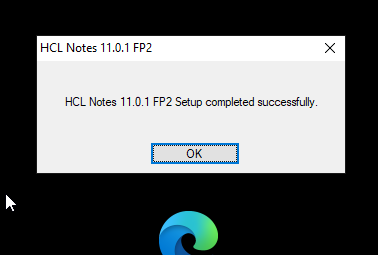
yes because we want to rollout the FP2 via baramundi (same like SCCM) And the returnmessage can not be confirmed by the user, because we lock the keyboard during installation.
so the user can not click "OK" here.
Is there any way to auto-confirm this message?
@Theater Magdeburg
Hi,
Thank you for your response.
As per my understanding, you are comparing the output result of command provided by us and rollout the FP2 via baramundi.
In command (which we shared), /qb+ has played major role.
Basically we use "/q" to Sets the interface level. but we use it with additional information to display appropriate information during the installation or upgrade.
/qn --> indicates no user interface displays during the upgrade.
/qb+ --> Displays the basic user interface and a message box at the end of the upgrade.
Even though, we use /qn which run with no user interface but the installation completion can be confirm by reviewing notesfixinstall.log or HCLNotesInstall.log in Document folder under windows user profile.
If you are rolling-out the FP2 via baramundi, you need to verify the logging in that. If its generate normal notes log, then you can refer notesfixinstall.log or HCLNotesInstall.log in above said path.
Let us know if you need any further information, we are happy to assist you further.
Thanks and Regards
Hemant Naik