We recently migrated our Domino server and it's now on a new domain instead of the same one as end user PCs (but there is a trust relationship between the 2 domains). So as we work through the DNS issues to get DNS resolution to continue to work, we've switched to using the direct IP to connect to the Domino server. However, this doesn't appear to work for the initial setup when the IBM Notes client (9.0.1) is installed on new PC. A few things I've verified:
The PCs can telnet to the server over port 1352, so there's no firewall issue.
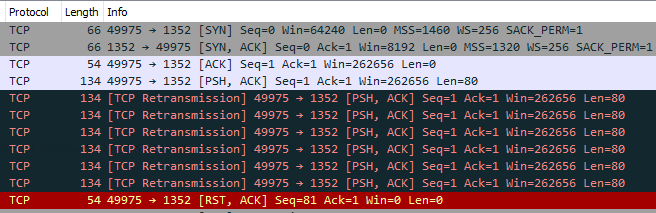
Using Wireshark, it shows a few initial packets going through, then a series of TCP Retransmissions and finally ending in a connection reset.
Because we can't connect to the server during the initial setup, we currently have a workaround of unselecting to connect to a Domino server (which then creates to the self-signed user ID). That then allows us to swap in the correct user ID file and to update the PNAB to add a Server Connection document that points to the Domino server. At that point, it works fine. Any ideas what's causing this issue?
It’s a new install that happens on every PC. We’re only using the Notes 9.0.1 client in our environment, but issue happens with the base version and with FP10IF8.
Update: I also verified the issue still happens with the 11.0.1 client.
Just tested, no packet loss during the entire attempt. And as noted, it works fine once we're actually able to launch the client and add a server connection document - just not during the initial setup.
Have you thought about adding the server‘s name and IP address to the workstation‘s hosts file - just for the install, perhaps using a script to add it, call the installer, wait for its completion and removing it.
Or adding a connection document for the server to the local names template. I’m not sure, but I think, it would be copied to the local names.nsf when this database is created.
Best solution would be to get your DNS server running.
I have tried a host file and that doesn't work either. I'll look into the PNAB template option. Keep in mind, the logs show it does connect to the server for a few packets, then just stops. So its not necessarily a matter of not having a route to the server.
I confirmed that adding the Server Connection document to the PNAB template doesn’t work either.
I suspect this issue is security or configuration issue (we also just recently started using ID Vault - but this issue happens even if I copy the ID file to the computer and/or use the config file referenced from the notes.ini). Specifically, I’ve seen the same unable to connect to the server message when the users local ID password doesn’t match the their password hash on the server.