I am trying to give Anonymous access to one of my demo apps. I added "Anonymous Users" to the initiators role according to this document: https://help.hcl-software.com/domino_volt/1.0.1/anonymous_access_security.html
Currently I still get the login form when I try to access the app. The help document says
"Note: Administrators must allow anonymous access first."
Where can I find this setting? Or does it mean I have to set the ACL for Anonymous to something else than "No Access" (which currently is set for the Volt Builder NSF).
I think the documentation is not that clear here.
Hello Oliver,
Have you followed the step 4 , 5 in the document.
"Note:Â Administrators must allow anonymous access first."
You should give read access for anonymous user In Volt Builder configuration file by default it "No Access"
https://help.hcltechsw.com/domino_volt/1.0.1/post_install_tasks.html?hl=anonymous
Thanks,
Venkat
Hi Venkat,
yes, I added "Anonymous" to the "Initiator" role which I also gave READ access to all stages. Still getting the login screen.
I also tried giving read access for Anonymous to the Config DB - still getting the login screen. In general the server accepts anonymous access.
Hi Oliver,
Have you restarted the domino server , after you made the changes in Volt builder config file?.
Thanks,
Venkat
I restarted the server though I do not see a reason as ACL changes should apply immediately. Still the same result, no access.
I have tried Anonymous access and it's working for me.
Steps I followed:
1. Upgraded Domino server from 11.0.1 to 11.0.1 FP1 and Volt from 1.0 to 1.0.1
2. Next I followed steps 1 to 5 as mentioned in https://help.hcl-software.com/domino_volt/1.0.1/anonymous_access_security.html
I have not given Read access to Anonymous in Volt Builder and Volt Config databases.
When we follow those 5 steps, it actually adds an Anonymous user in App database's ACL with Author access rights to create document and role is "Anonymous". So check the ACL for your application database from Notes client.
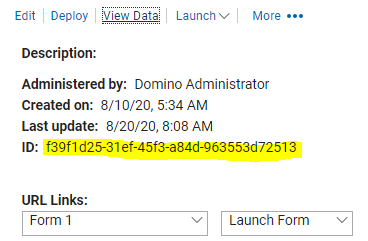
If you have multiple Apps then you would need to identify App id of your application to open app database on Notes client. Volt saves the App NSF filename with this App id in the Volt folder on server. To locate App id open your Manager.html page and click on application to expand for more details and you should see the ID something like below.
File path:

Also try restarting the Domino server.
Test with a newly created App.
I hope this helps.
Note that below document does not ask us to give Reader access to Anonymous in Volt builder and config database. In fact it says Anonymous should be NO ACCESS.
https://help.hcl-software.com/domino_volt/1.0.1/post_install_tasks.html
Yes, I know, it was just a test
I checked the ACL of the NSF it self, it has Author access set for Anonymous, also Role "Anonymous" is applied to it - still the same issue.
Check the permission in java policy file.
https://help.hcl-software.com/domino_volt/1.0.1/install_server_config.html
It is different from earlier version 1.0.
https://help.hcl-software.com/domino_volt/1.0/post_install_tasks.html
I have changed as per 1.0.1 documentation.
Did you tried server restart ?
Do you get same problem if you try with new App ?
I added the section in java.policy and restarted the server - still the same issue.
I also tried with a brand new app (the one I tried first was an existing one).
I hope you are on Domino server 11.0.1 or higher as per https://help.hcl-software.com/domino_volt/1.0.1/install_overview.html
Can you try re-installing Volt 1.0.1 again. If there is any problem from backend then re-installation might fix it.
I am on 11.01FP1 and I upgraded Volt from 1.0.0 to 1.0.1.
Is there any log that I could check when I try to access the app?
You can refer below logs in this path "...\HCL\Domino\data\domino\workspace\logs"
1. error-log-0.xml
2. trace-log-0.xml
3. Log_Viewer.xml
4. Trace_Viewer.xml
You can also set below log level settings for more detailed logs in rcpinstall file at path "...\HCL\Domino\data\domino\workspace\.config\"
com.ibm.form.level=FINE
com.ibm.form.nitro.level=FINEST
com.ibm.form.builder.level=FINEST
com.ibm.hrl.level=FINEST
com.ibm.freedom.level=FINEST
com.hcl.nitro.level=FINEST
dleap.level=FINEST
Note: Enable the verbose logging, reproduce the issue and then remove the logging. Do not leave verbose logging enabled as the logs can grow exponentially and potentially cause performance issues.
You can refer below article for more information about logging.
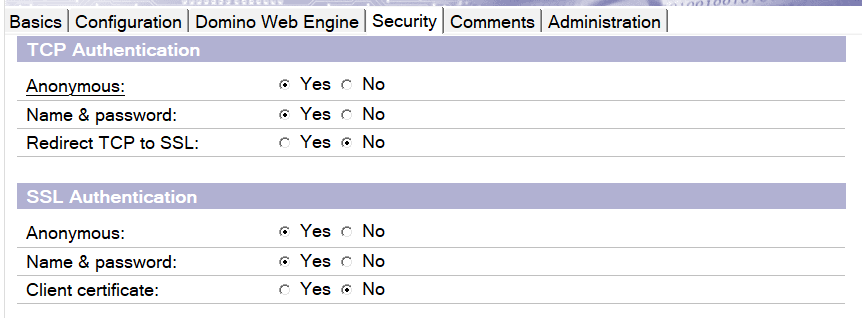
Oliver, have you allowed Anonymous access at the HTTP level? If your server is using internet sites, check these settings in the web site document:
In this case, the server allows Anonymous access for both HTTP (TCP) and HTTPS (SSL).
Yes, Anonymous is enabled