Hi
Does anyone know if the Notes client supports out of office notifications from external and internal mail senders?
What I am wanting to do is to set up one type of OOO for addresses from external sources and another for internal sources.
Thank you
Richard.
Hello Richard,
This would be an enhancement request. Currently Notes is not having feature to set two email address for OOO.
Thank you
Regards
Shrikant J
Hello Richard,
Sorry, If there was any confusion in understanding your requirement.
If you are looking for alternate email address has to be set for OOO messages like for internal email it should be set as "John Doe/Acme" and for external sender instead of actual email address of John Doe user as john.doe@acme.com you wanted to set different email address then, as said it would be an enhancement and currently Notes doesn't have this feature.
However, if you are looking for different set of out of messages for some specific senders you can use the Alternate Notification in the OOO settings.
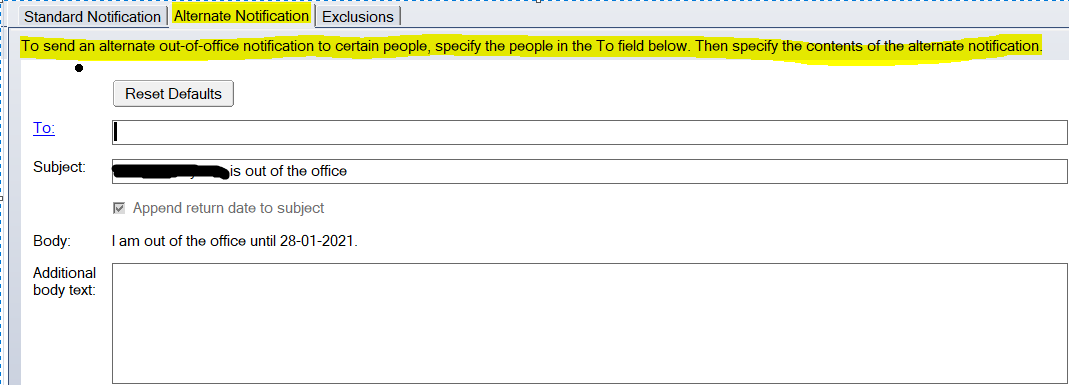
Let me know if you have any questions or concerns.
Thank you.
Regards
Shrikant J
Thank you Shrikant, this was what I expected, having looked at the ideas portal link.
I was on a security seminar earlier today and they suggested that having different external and internal OOO notices, can protect the sender to external threats, because when an external recipient sees that the sender is out off the office and the sender has put on lots of alternative people to contact in their absence, it gives any potential hacker, more information to use, and to then start targeting the other people as well.
Hello Richard,
This work with 0365 and exchange email addresses.
please set the option in the configuration document set as Disposition-Notification-To and check.
- Make sure you already have a Configuration Settings document for the server(s) to be configured.
- From the Domino® Administrator, click the Configuration tab and expand the Messaging section.
- Click Configurations.
- Select the Configuration Settings document for the mail server or servers you want to administer and click Edit Configuration.
- Click the MIME > Conversion Options > General tab.
- Complete these fields, and then click Save & Close:
- Return Receipt Mapping select to Disposition-Notification-To
Please refer to the below link for more information.
https://help.hcltechsw.com/domino/11.0.1/admin/conf_enablingdominotoprocessreturnreceiptsforsmtpmessa_t.html
regards,
Sudhir
Hi Sudhir
Thank you for your reply, but it's not quite what I was looking for.
This refers to 'return receipts', whereas I was asking about 'out of office'.
Still useful though.