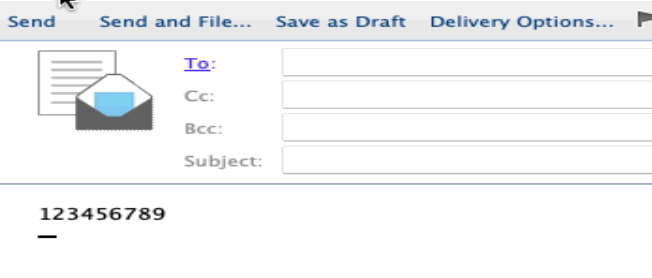
1. There is no mouse cursor in the address bar and the entered address cannot be displayed
2. The address in the address bar cannot be selected
3. The address you entered cannot be deleted because you cannot see it
4. The cursor cannot be displayed for the input content in the text
Can you confirm few details about same.
1) Issue appearing with one or multiple user.
2) Notes Client complete version.
3) Mac OS full build
Please try below steps and confirm if issue still persists.
1) Close the Notes client.
2) Delete cache.ndk in the data directory.
3) Also change the name of the "Workspace" folder in the data directory to another value such as "Workspace_old".
4) Start the Notes client again and try to reproduce the issue.
@Mr. Zhao
Hi,
Basically, this is a known issue seen on Mac OS Big Sur with Notes Client 10.0.1
1. Type issue in To, CC, Subject, Meeting Location, etc. Keyboard strokes are not seen.
2. Cursor can not be seen at To, Cc, Subject, etc thus difficult to see the focus.
3. Typing in To, CC, is not seen at all.
4. Also in the message body, letters can be typed but difficult to see the cursor focus.
Found this issue was already reported to the development team through SPR#AYAVBTJCRX
This issue has been fixed in Notes 10.0.1 FP6 IF1 for MAC OS.
As per the shared information, I tried to test information with Notes 10.0.1FP6 on macOS Big Sur Version 11.0.1 in my test environment.
Please refer to the below screenshot for reference.
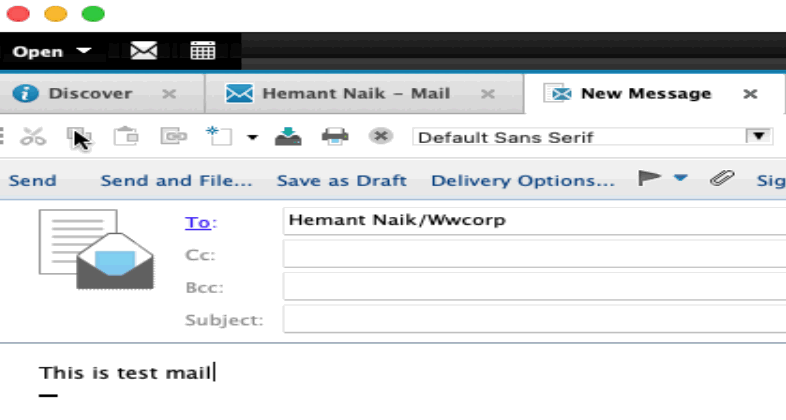
This issue has been fixed in Notes 10.0.1 FP6 IF1 and verified in my test environment.
Please refer to the below screenshot after applying fix 10.0.1 FP6 IF1.
Also if you are planning to upgrade to Notes 11.0.1, Please install Notes 11.0.1FP2. This same issue was reported in Notes 11.0.1 but fixed in 11.0.1FP2.
https://ds_infolib.hcltechsw.com/ldd/fixlist.nsf/Public/4830FC7BC496EA97002586230082022D?OpenDocument
Let us know if you have any further queries or questions
Please mark this question as answered and helpful if this answered your query.
Thanks & Regards
Hemant Naik