One of our employees had calendar issues and I discovered several script libraries that were modified by someone years ago. I removed the "No Refresh" check mark next to all of the script libraries that were modified and refreshed the design from our mail template and the calendar entry problems went away.
I started looking at the designs of other mail files and it's hit or miss, some have the modified design elements and some have the ones from the template. Refresh Design and Replace Design commands do not replace the elements that have the check marks, so I have to do it manually.
Is there an easy way to identify the mail files that need this modification instead of opening each one in designer to look at them?
Depends on what you consider "Easy". You can write some code that runs in an agent with enough rights to collect and report all elements that are locked and even unlock them.
All design elements have a field "$FLags". And if this field contains a capital "P" then the element is protected. For logging it might be interesting to get the "$Title" item as it contains the name of the design element.
You can use NotesDBDirectory to get all databases and then NotesNoteCollection to get all design elements.
Take care: ALL User folders in mail files need to be protected. Don't unprotect them or they will be gone.
Folders have the letter "Y" in their flags and in addition an "F" as well.
To "unlock" the documents you just remove the "P" from the flags field. You need to sign the design element before safe, otherwise it will be corrupted.
Some elements might inherit their design from another template instead of having the flag set. Then you need to watch out for "$Class" item that contains the name of the template where these elements come from
Code (only for protected) would look something like:
Dim ses as New NotesSession Dim dbDir as NotesDBDirectory Dim db as NotesDatabase Dim nn as NotesNoteCollectionDim strId as String
Dim docDesign as String
Dim strFlag as StringDim strFlagNew as String
Set dbDir = ses.GetDbDirectory( “yourServer” )
Set db = dbDir.GetFirstDatabase( DATABASE )
While not db is Nothing
If Left( db.FilePath, 5 ) = “mail" then
Call db.Open(”“,”")
set nn = db.CreateNoteCollection(True)
call nn.BuildCollection
strid = nn.GetFirstNoteID()
While strId <> “”
set docDesign = db.GetDocumentById( strId )
strFlag = docDesign.GetItemValue( “$Flags”)(0)
If instr( strFlag, “P” ) > 0 then '- Protected
'- log
Call LogSomehow( "Found protected element: " & docDesign.GetItemValue( “$Title” )(0) )
'- and/or unprotect
If not (Instr( strFlag, “Y” ) > 0 and Instr( strFlag, “F” ) > 0 ) then '- don’t change user folders… they NEED to be protected
strFlagNew = Replace( strFlag , “P”, “” )
call docDesign.ReplaceItemValue( “$Flags”, strFlagNew )
call docDesign.Sign()
call docDesign.Save( True, True, True )
End If
End If
Wend
End If
Wend
Take care: This code is just typed down from the top of my head. Don't use it untested. It does not contain error handling and might contain some typos.
Thanks. I wish I knew LotusScript.
I really recommend even "pure" Domino Admins to take at least one course in LotusScript- programming. There are LOTS of things that cannot be done with default tools but can be easily done with only few lines of code.
Or you have a trusted consultant at your hand to write these little tools for you. For above code one should not charge you much more than one hour of coding and probably another hour of testing and running the code in your environment.
Hello Quin!
Besides the suggestion described by Torsten, there is a way to enable/disable the option "Prohibit design refresh or replace to modify" for all design elements of a database.
It is available per database:
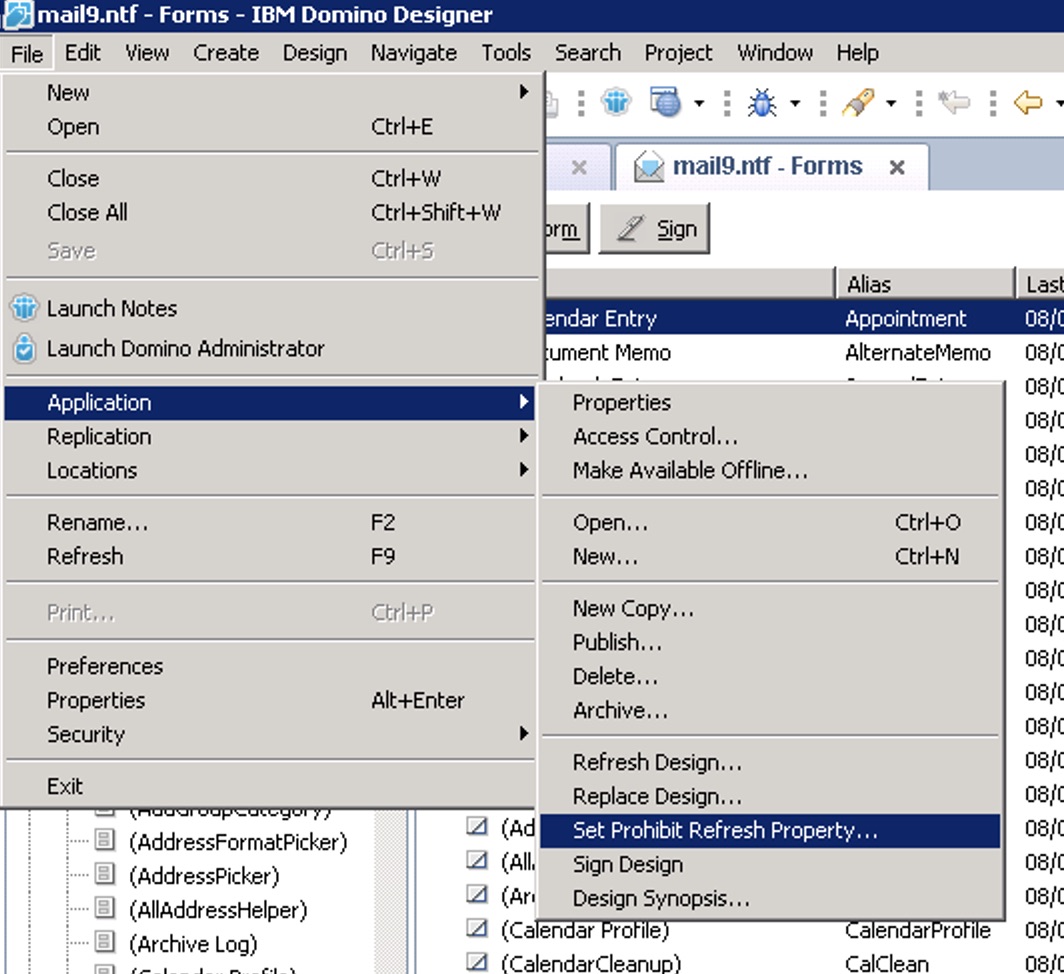
Open the database via Domino Designer then go to File > Application > Set Prohibit Refresh Property...
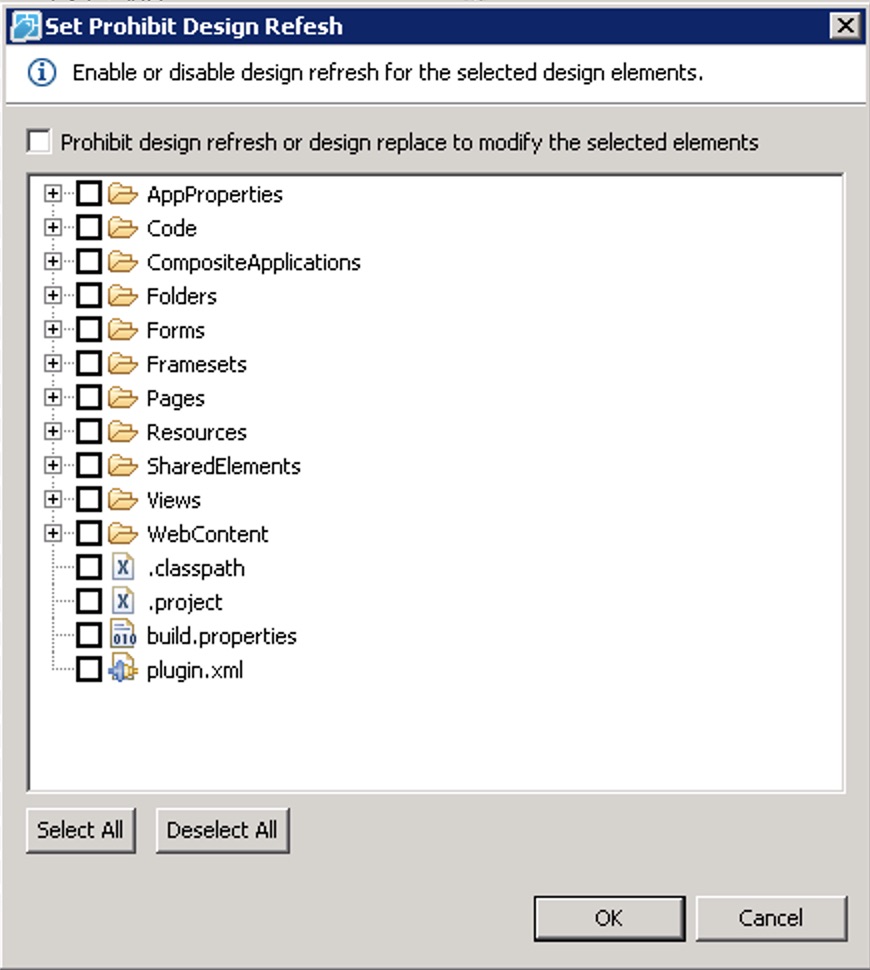
Then enable/disable the option "Prohibit design refresh or design replace to modify the selected elements" and "Select All" elements.
I hope it helps!
Regards!
Rodrigo de San Vicente
Staff Software Engineer
Collaborative Workflow Platform
If using the above designer tool, above, make sure and uncheck folders after clicking the select all as we need the prohibit flag on the folders.