Implementing any app throws error "this app is currently being implemented" / "Diese Anwendung wird derzeit implementiert. Versuchen Sie es später erneut".
It doesn't matter, which Volt app I choose - even the example apps.
Everything works fine before installing the new Domino Server fixpack FP1 for version 11.0.1.
Should it be any context between these events (without temporal)? TO exclude tihs, I have already reinstalled Volt 1.0.1.9, checked java.policy, but the error message remains.
When you say "implementing" do you mean deploying ? So my question, Are you getting this error while deploying app ? Did you tried creating new app after upgrade, to see if the problem occurs with new app as well or not ?
When I upgraded to Domino 11.0.1FP1 and Volt 1.0.1.9, I was facing this error "Application failed to validate" while deploying app. The issue got resolved when I added below permission to java policy.
https://help.hcl-software.com/domino_volt/1.0.1/install_server_config.html
grant codeBase "file:/groovy/-" {
permission java.security.AllPermission;
};
This is different from earlier Volt version.
https://help.hcl-software.com/domino_volt/1.0/post_install_tasks.html
grant codeBase "file:/groovy/shell" {
permission java.security.AllPermission;
};
Check if this helps to resolve the error.
Yes, I mean "deploying" ("implementieren" in german language version).
"Application failed to validate" appears in a dialog window. Server console and log file are logging "this app is currently being deployed".
java.policy already shows the new permission grant codeBase "file:/groovy/-".
Deploying a new app is working, some example apps, too (may be the apps that are never used/opend before).
Even a newly created app from an export of an app which can not be deployed any more, can be deployed. This will be a workaround, but I'm already using some links to documents in my apps.
Check the status of dleap using server command "tell http osgi ss dleap"
The status should be Active like this.
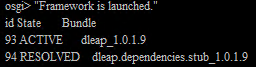
If it is not then try re-installing volt again.
I was about to suggest you next, exporting App and importing same again. If you are concerning that creating new App from existing one is going to change document id, resulting in document links not working in newly imported App, then it is not going to happen. The document link is NOT going to change and will still work in newly imported App. To confirm this, you can simply create a new simple App with some document links, then export this app and import same to create new App to test the document links.
If this is not your concern then you can share your concern which stops you from using workaround of exporting and importing App.
It appears some applications are locked. To unlock an application:
- Open VoltBuilder.nsf in your Notes client.
- Select the Applications or "Applications by Owner" view
- Find the locked application and open it.
- Look for the Compile/Deploy field. "Locked for Compile/Deploy" means the application is locked. See the screen shot below.
- Edit the document and clear the checkbox.
- Save the document.
- Return to the Volt manager page and try again to deploy the application.
YESSSS !!!! Thank you very much for the quick support!!!
