We are now close to releasing the first VOLT app.
However, we need a little more work in setting up the application as a website to work as expected.
The first simple solution is to set the "Home URL" of the website to the view data url, like:
/volt-apps/secure/org/app/92e85711-f100-4044-873a-e2c98ff2acf3/viewdata/index.html
This works fine for the first hit on the website - and correctly redirects to the login form and after succesfull login continues to the site.
However, if you are already logged in then it will not redirect (and just reports many wrong url's in the JS console). I have tried add a redirect of
/*.html* --> /volt-apps/secure/org/app/92e85711-f100-4044-873a-e2c98ff2acf3/*.html*
which we normally use for XPages apps (and another one with the latter redirecting to itself to avoid too much redirection).
However, this does not work with the VOLT-application. So looking for some advice on how to best configure this?
Why did you choose this url? Instead I would expect you to use the URL that goes directly to the form, something like:
http://localhost/volt-apps/secure/1/app/e2af3092-ed23-4207-8140-b9fd20043a78/launch/index.html?nl=en-US&form=F_Form1
Can you try with this style url to see if it behaves differently?
Well, isn't that exactly what I'm doing? In this case I have just copied the url that I get when selecting "View data" (and not a particular form) from the Domino Volt management app.
Customer has a domain name that they want to use for this app (with a subdomain like app1.mydomain.dk). I want that site/url to open the VOLT app (with the overview of the data).
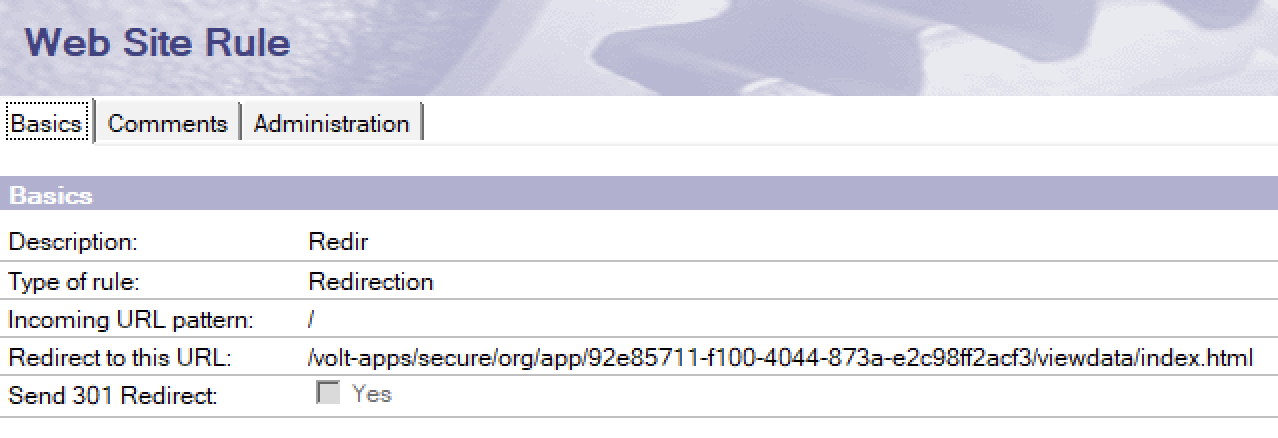
So now I just tried to "fix" the issue where the redirect doesn't work once logged in by adding this website rule:
The website itself has just been set up pretty standard (by copying the site doc. used for the VOLT management app):
... and it doesn't work either. If the session (login) is still in effect the opening the site by just opening the subdomain throws all sorts of errors - and just shows a blank screen: