Hi,
I am trying to configure the Sametime embedded client to login automatically and I am a bit confused.
There are tree (2.5) ways to configure Sametime automatically:
- Domino Desktop policies (fields Sametime Server and SSO)
- custom settings (Desktop Settings)
- Managed-Community-configs.xml
If I want that the user does not need to click on "Use token-based SSO" when using Sametime the first time, I can skip 3., because that needs the user to have been logged in to sametime at least once.
1. does not work. I can enable "Log onto Sametime using Single Sign-On (SSO)" and set it to enforced, but it does not have any effect, although I can see it in the local policies and even in the prefs (com.ibm.collaboration.realtime.community.sametime.prefs) file.
That leaves 2. But there is no documented "loginAtStartup". When using "com.ibm.collaboration.realtime.login/alwaysloggedin=true", the checkboxes for "Save PW" and "Automatically logged in" are checked and greyed out, but they do not have any effect. But at least clicking "Log In" works and then the settings from 1. can start to work.
Summary:
Is there really no way to make Sametime embedded work automatically from the start?
Do I really need to make use of all three ways together to make it work?
Thanks for any thought.
Regards,
Manuel
Hi Manuel,
There are several ways you can approach this. However first you need to make sure that the back end servers are configured properly. Additionally, there are different kinds of settings, one is managed settings, the other is managed community configs. These are different files. There are some settings you can add to the plugin_customization.ini.
See topics:
https://help.hcltechsw.com/sametime/11.5/admin/admin_st_mng_files_comm.html
https://help.hcltechsw.com/sametime/11.5/admin/config_client_mng_xml_pref.html
https://support.hcltechsw.com/csm?id=kb_article&sysparm_article=KB0036468
When you want to use Token based sign on, you need to have everything working on the servers behind the scenes first, then approach getting it to sign on automatically. The steps for this depend on the type of token you are trying to use (Notes SSO, SAML, SPNEGO, etc)
If you are having trouble, please open a case with HCL support.
Thanks,
Casey Toole, HCL
Hi Casey,
thanks a lot for your help.
Can you please clarify, how I would configure the managed-settings.xml alongside managed-community-configs.xml?
Can I add them both to im.2012 in policies.users.xml? Would I duplicate this attribute?
A request for update if you don't mind :):
https://help.hcltechsw.com/sametime/11.5/admin/config_client_login_pref.html
the attribute "autoLogin" (the first) seems to be in wrong case.
It works with "autologin", but not the with "autoLogin". Alexander Novak set me on track here.
Thanks again!
Regards,
Manuel
Hello Manuel,
about the desktop setting for Sametime SSO - there was an old bug in the policy form that this settings was not set correctly. Did you try to create a new desktop policy setting ?
Otherwise i would suggest to rollout your sametime settings via "custom settings" section inside the desktop policy setting document.
Please be aware that these parameters are case-sensitive
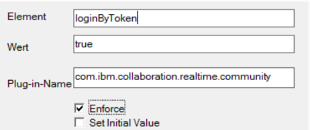
Login by Token/SSO
> com.ibm.collaboration.realtime.community/loginByToken=true
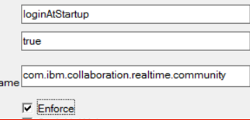
Autologin at Start (you need both parameters)
> com.ibm.collaboration.realtime.community/autologin=true
> com.ibm.collaboration.realtime.community/loginAtStartup=true
After saving they will look like this
Be aware that you some of the parameters cant be set if you have already configured your Sametime Settings on the Notes-Client > thas why some of the settings are rolled out via managed-settings.xml.
Only when you reset your Sametime community - some of the settings are set.
The option via the managed-community-configs.xml (changing parameters) or managed-settings.xml is only usable for already logged-in users.
But you can also deploy the parameters for new notes installations via the <notesprog>\plugin-customization.ini, so that the settings are deployed on first notes client start.
Hope this helps a little bit
Thank you Alexander.
Two pieces of info were essential:
- autologin and loginAtStartup need both to be present (It was, but I was not sure about that)
- The settings are case-sensitive and autologin is NOT in camelcase (I had written it autoLogin)
Now it works perfectly! Thank you!